//

FORDยบOWNER

//

NORTHยบAMERICA โžž GLOBAL

//

WEB

// FORDยบOWNER // NORTHยบAMERICA โžž GLOBAL // WEB

Ford Owner Web I was the North American Design Lead on the Ford Owner Web workstream through a full AEM migration โ€” rationalizing a fragmented, regional, single-channel experience into a unified global authoring system that fed Ford's Global Design System, setting standards across Web, App, & In-Vehicle. Owner.Ford.com โž
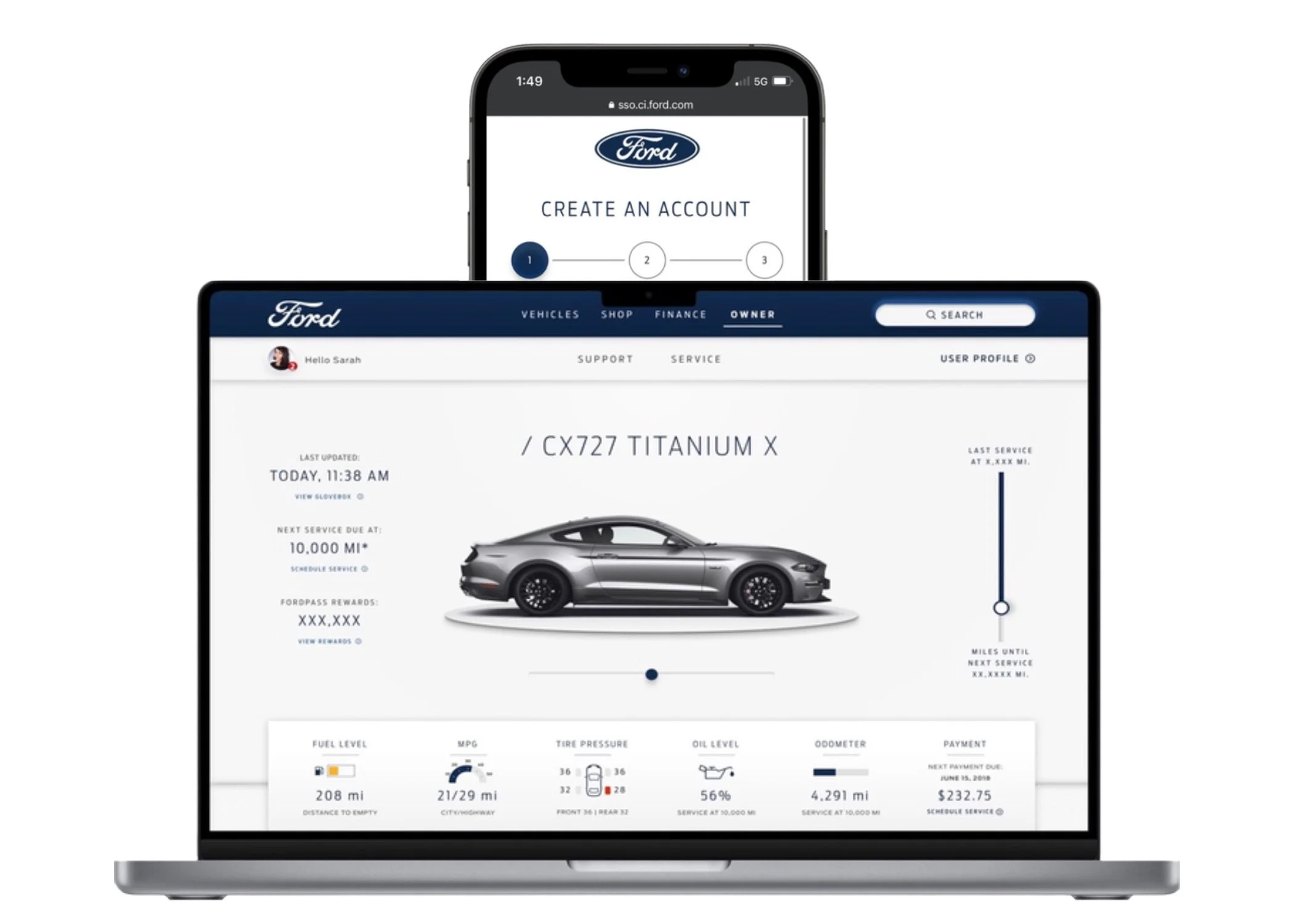
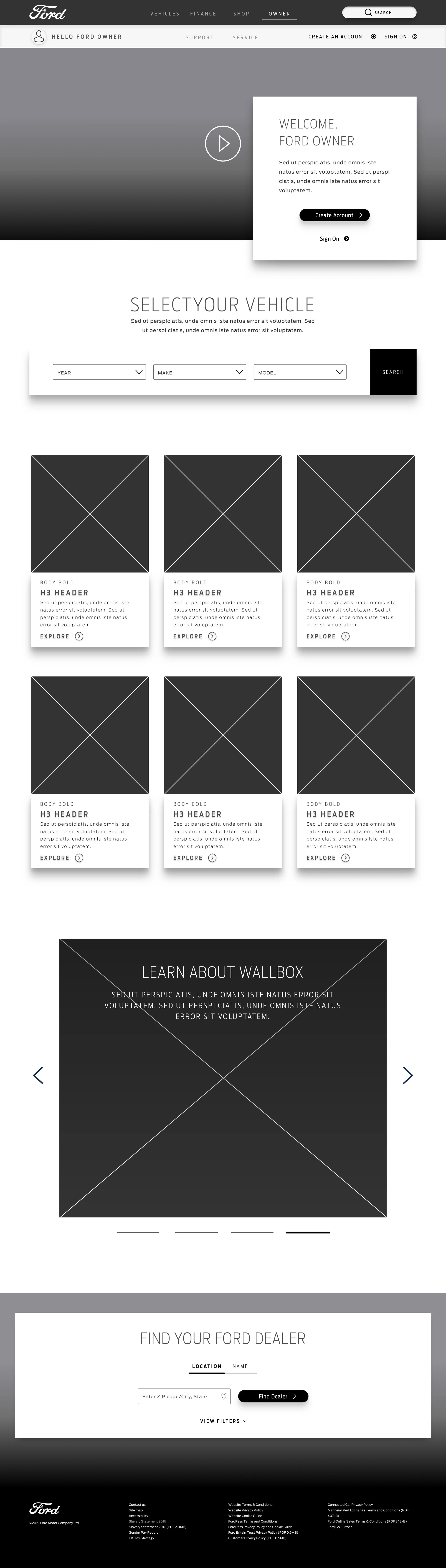
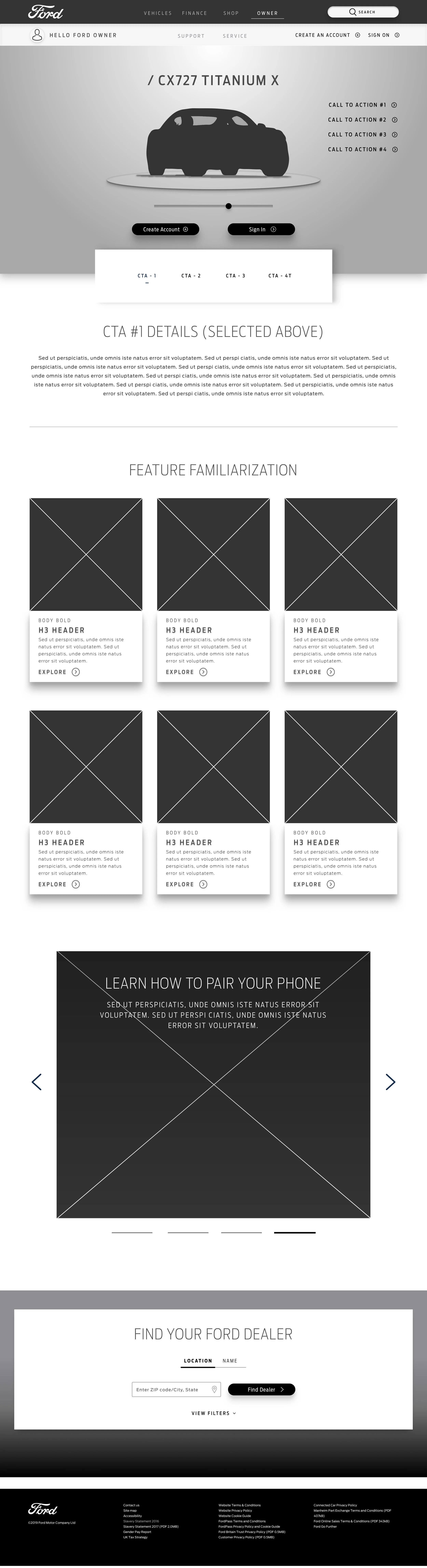
Ford Owner Web โ€” Multi-device overview
Agency VMLY&R
Client Ford Motor Co.
Timeline Nov 2018 โ€“ Dec 2020
Surface Web
North American
Owner Web
Design Lead
VMLY&R ยท Agency of Record, Ford
Platform owner.ford.com (Web)
Market Reach NA + Europe ยท Lincoln
Migration AEM 6.1 โ†’ 6.4
Duration ~2 Years
Large cross-functional program. I owned the NA Owner Web workstream โ€” 100% of the UI and UX across roughly 65% of the platform scope. The Global Design System that followed was built by a dedicated core team of 5 โ€” I fed that system from the Owner Web side. Ford and Lincoln share the same AEM authoring system, so this work extended to Lincoln Owner as well.
UI Scope Audited and redesigned 100% of platform components through the migration.
UX Scope Led UX decisions across ~65% of the platform. Owned UI on all workstreams start to finish.
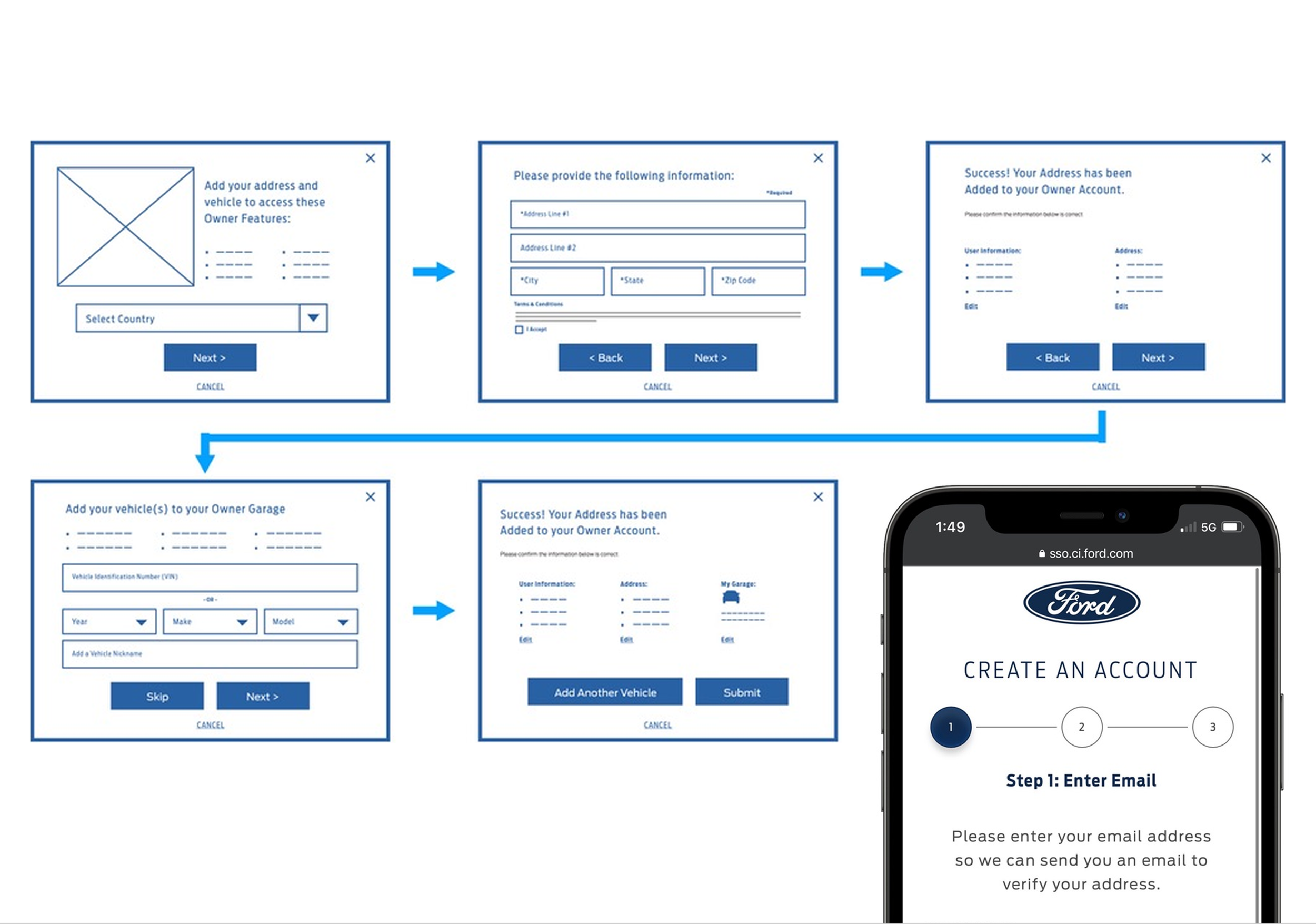
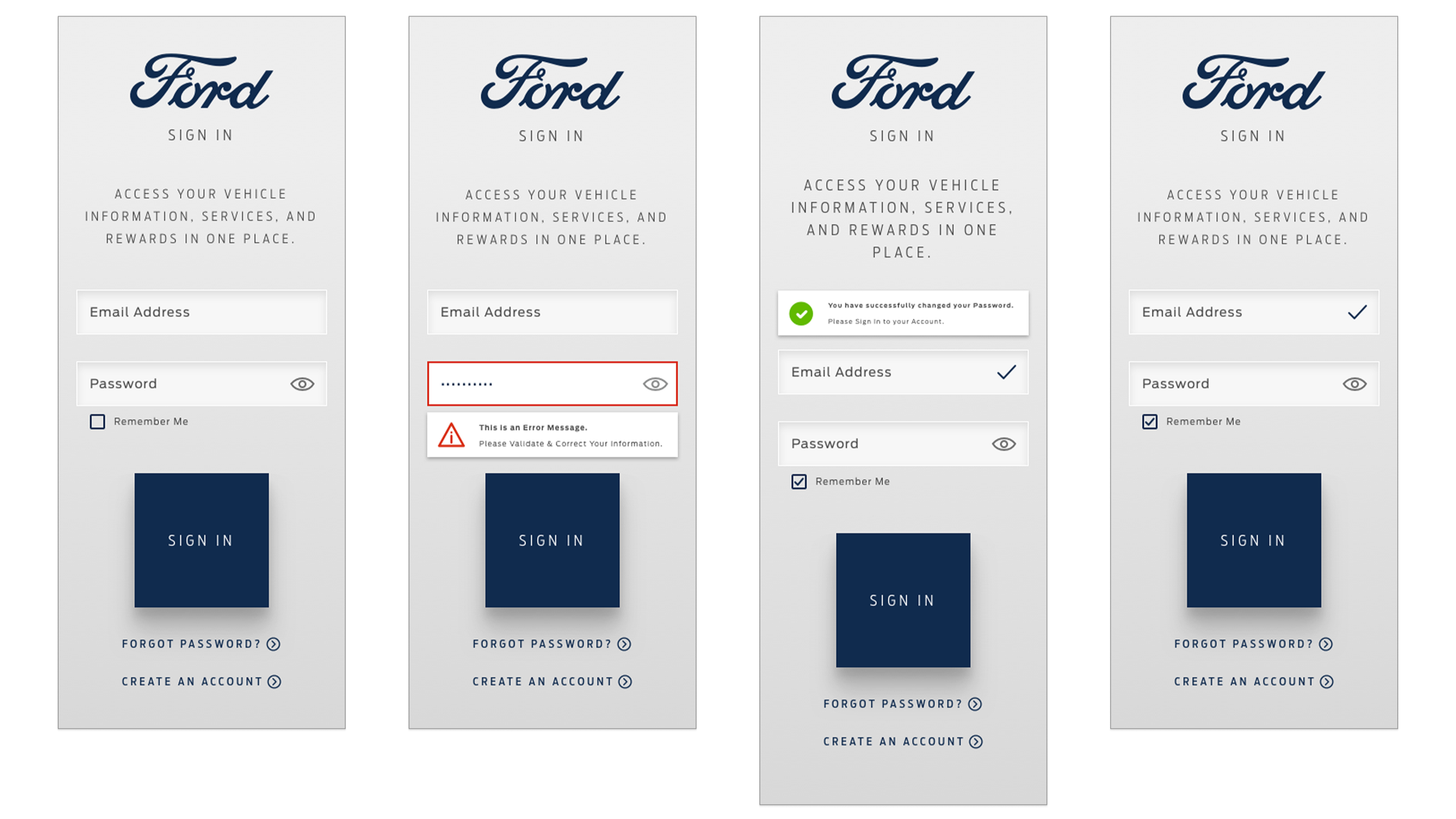
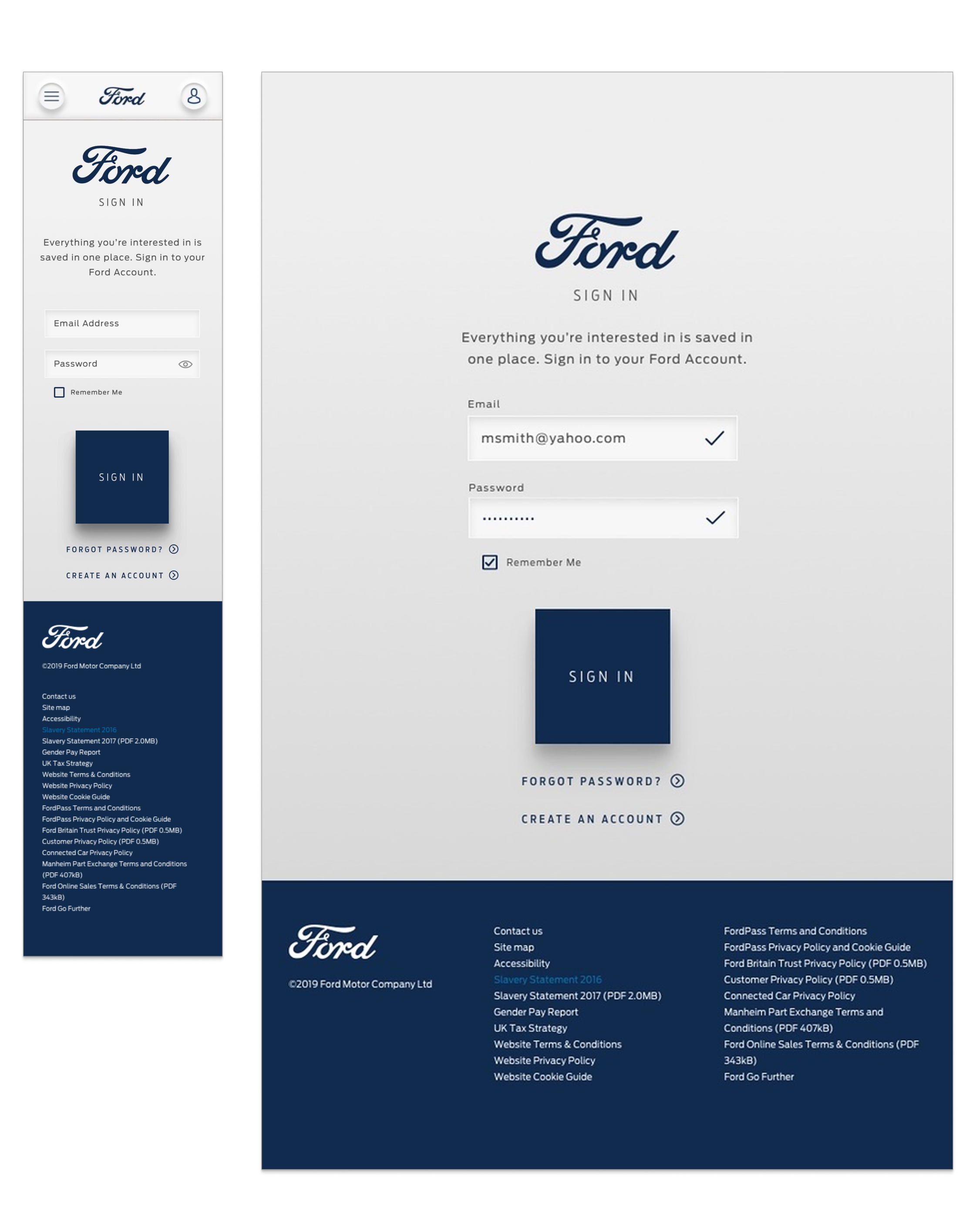
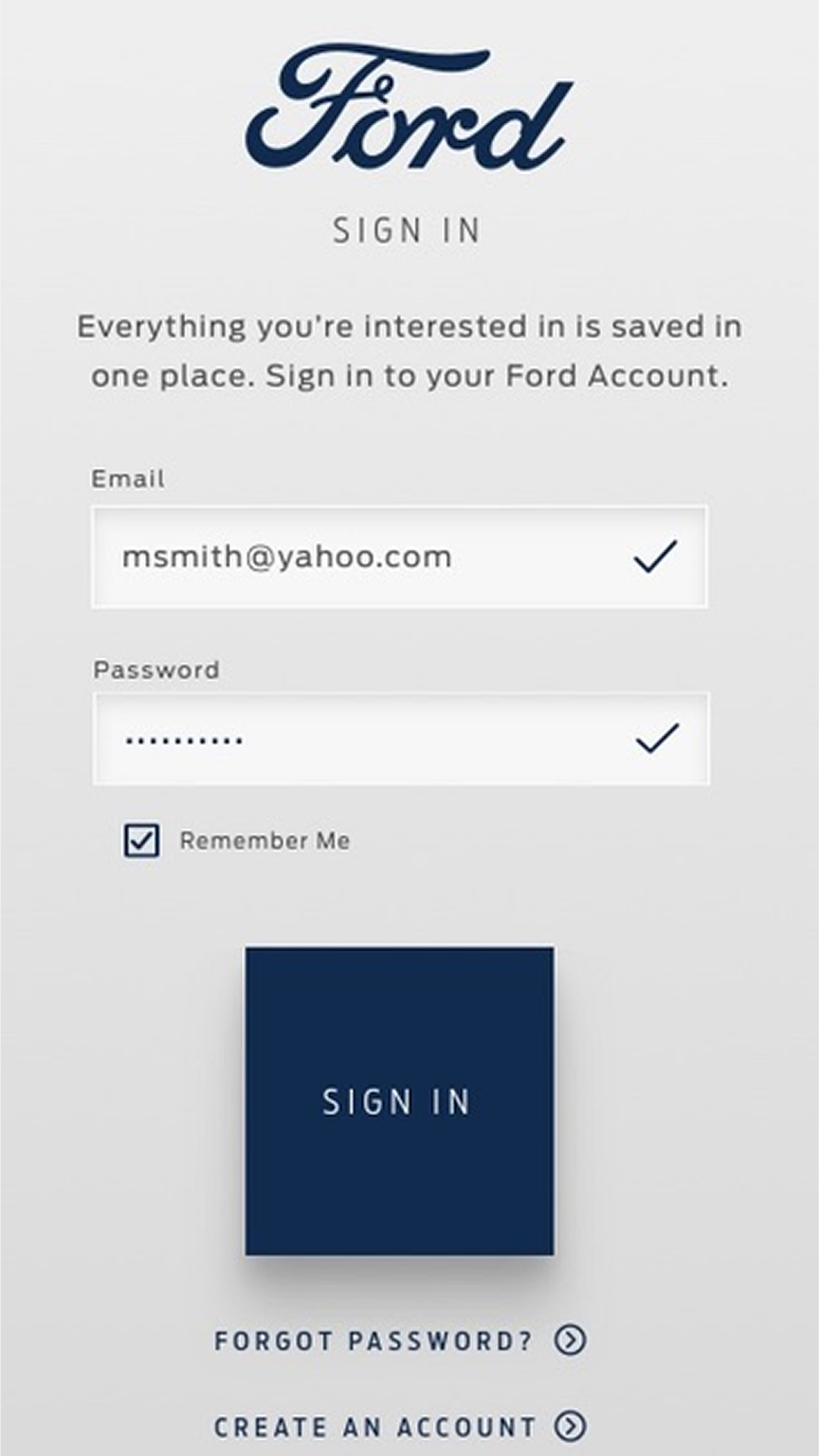
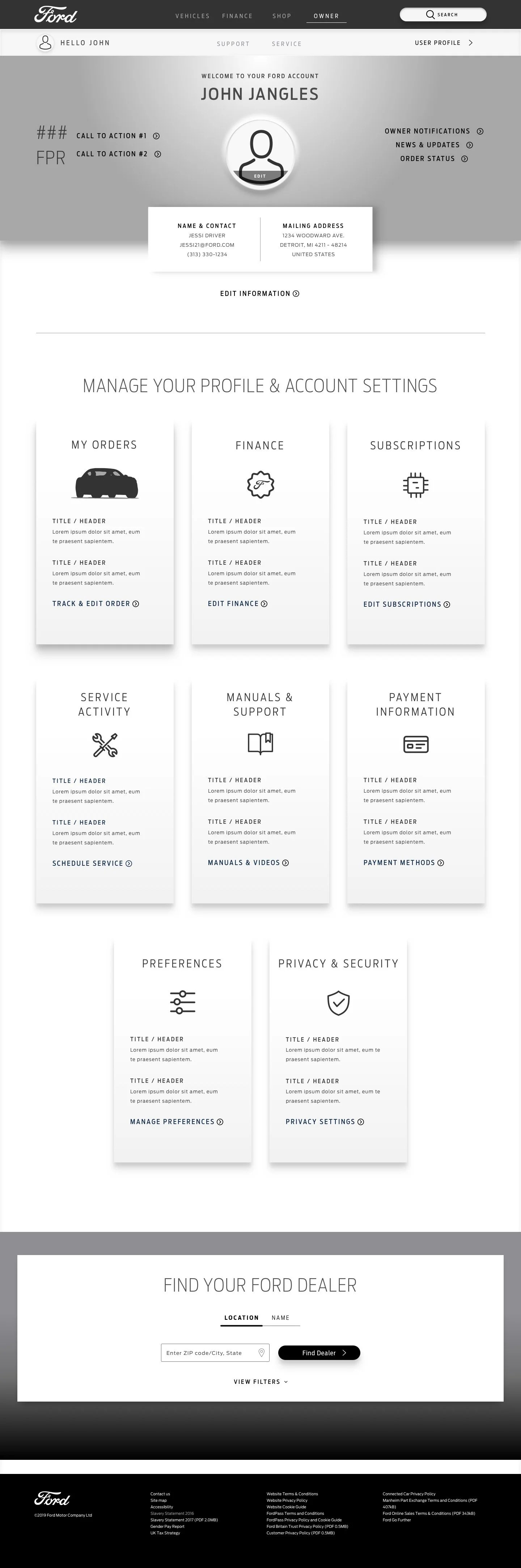
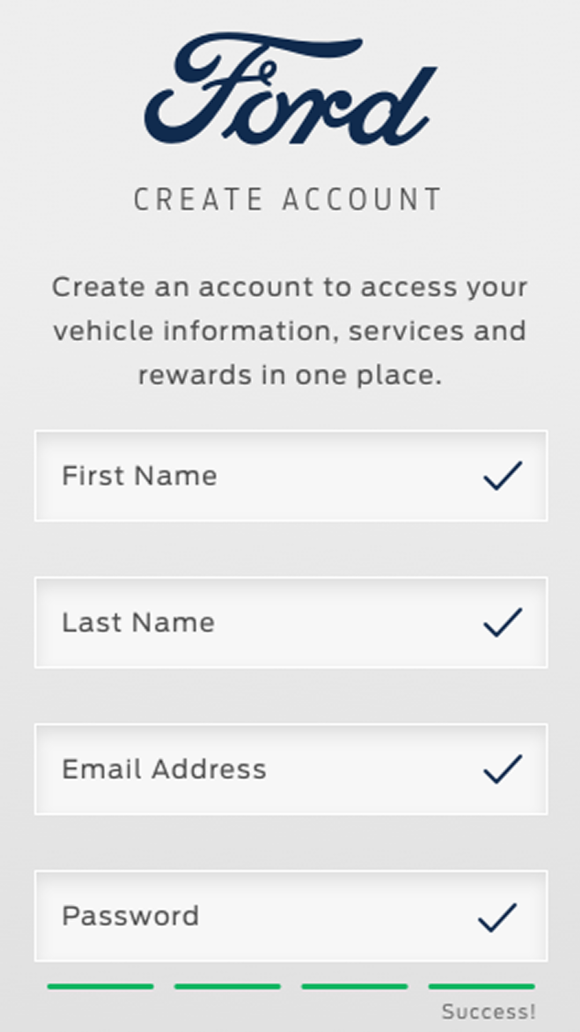
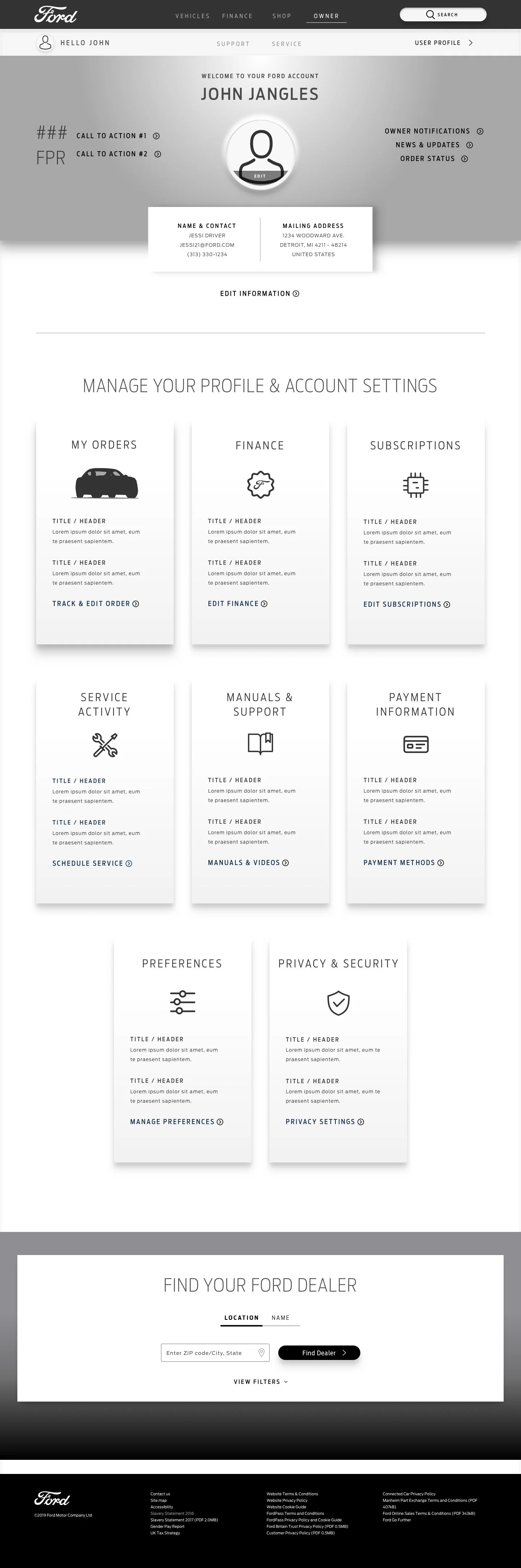
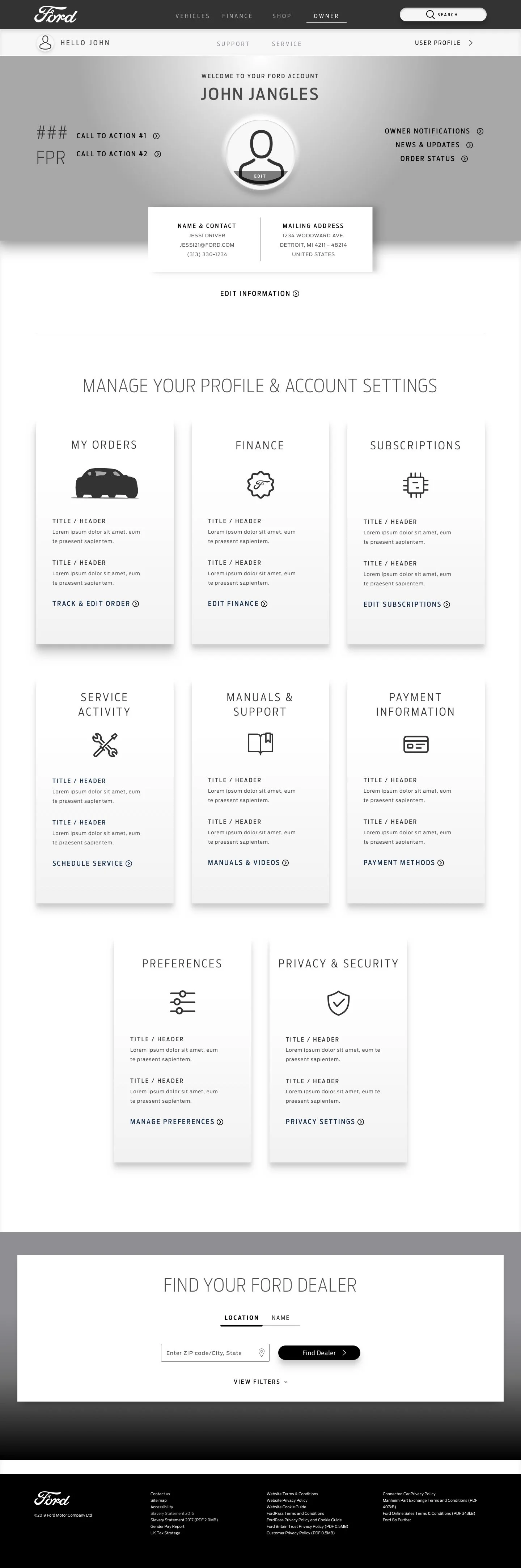
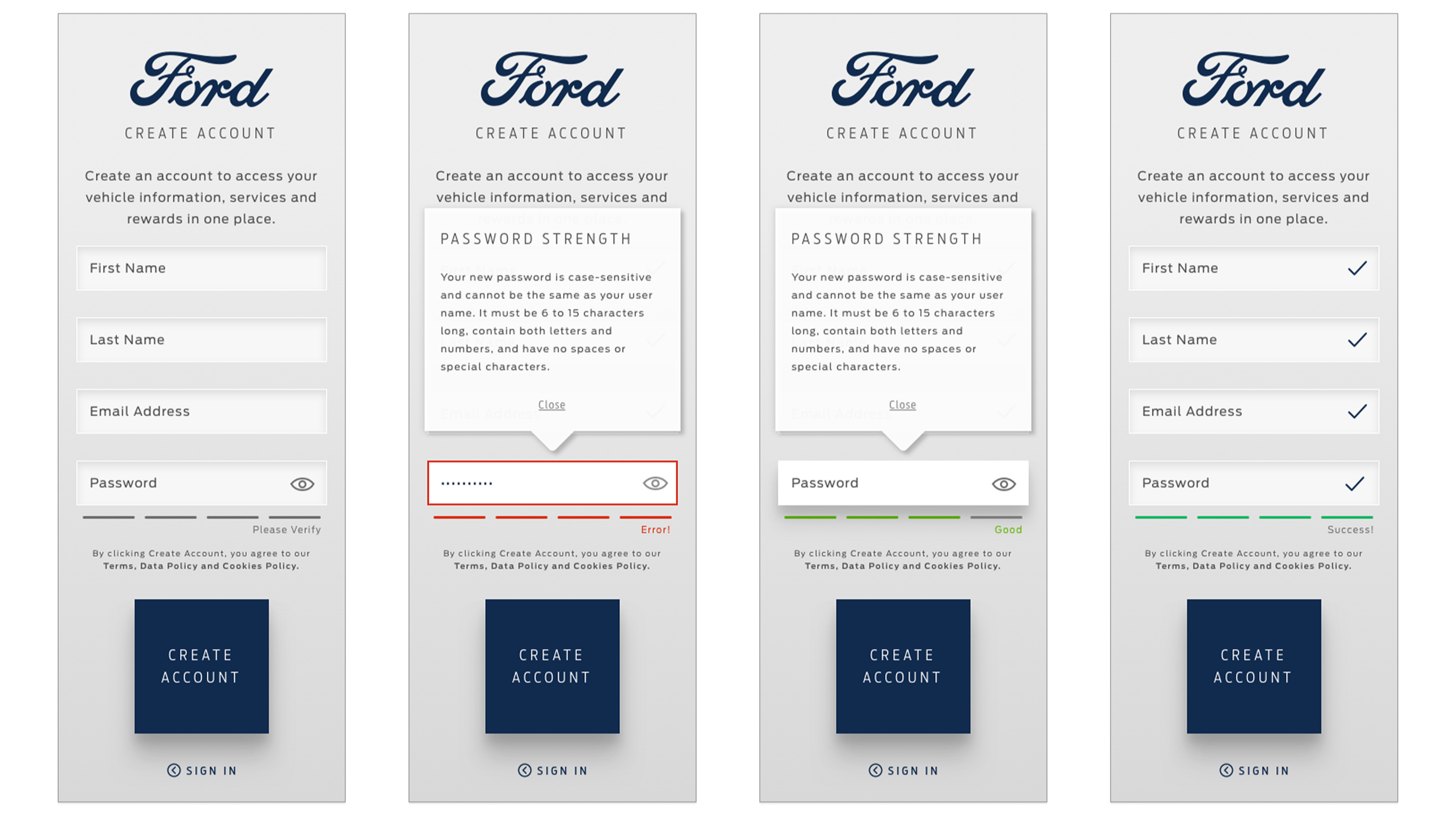
Auth / SSO Full FMA/SSO flow โ€” account creation, sign-in, reset, consent. Highest-friction surface on the platform. Mine start to finish.
Accessibility WCAG validation on all core components โ€” embedded during audit, not retrofitted. Shipped clean.
Research Synthesized years of Owner research. Ran 2 FMA/SSO surveys, ~12 heatmaps. Cross-applied Lincoln Owner findings where patterns matched.
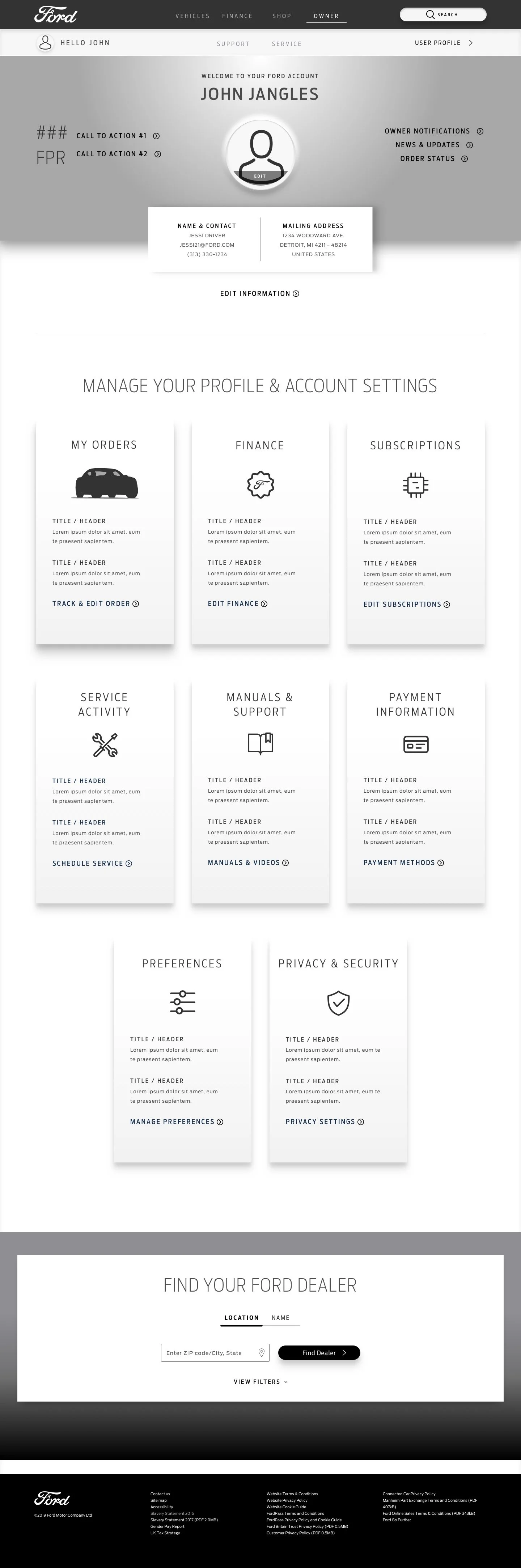
View SSO + Account Screens โž
What Was Actually Broken
From
From โ€” fragmented Owner experience
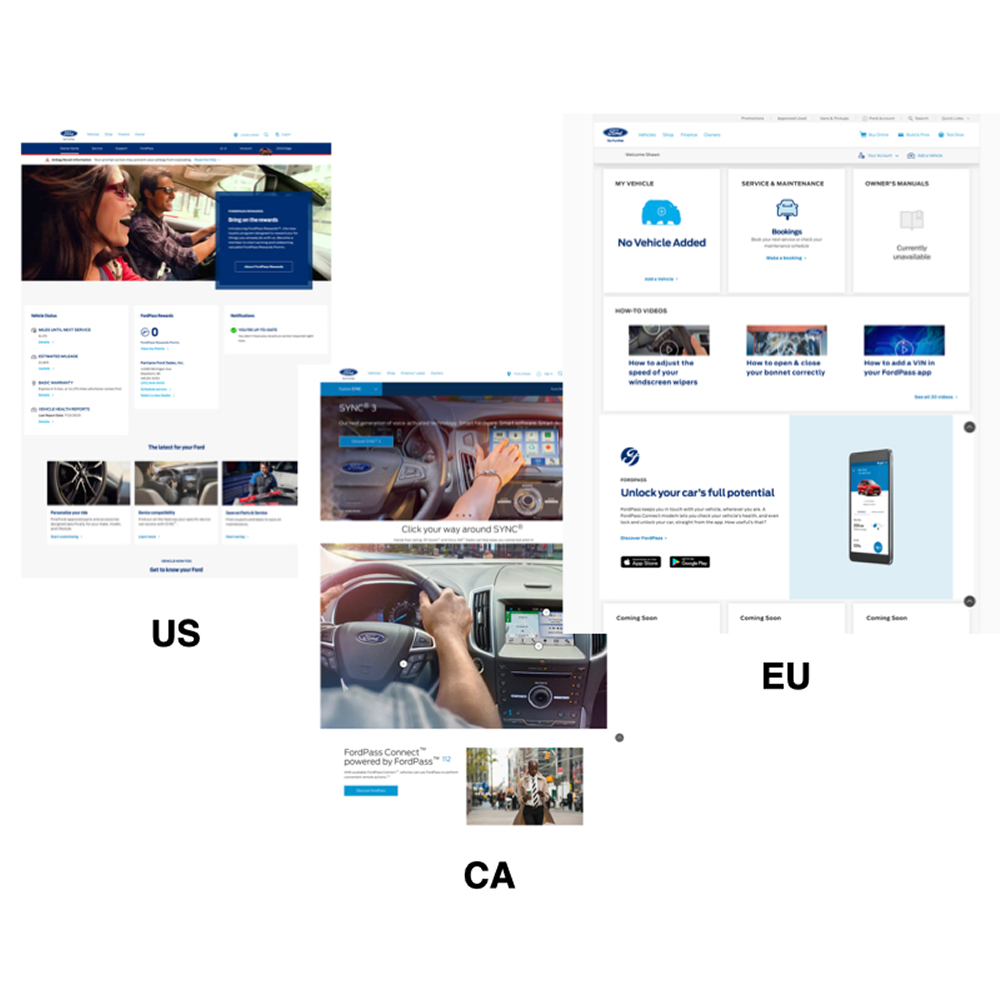
Every western market on its own stack, its own patterns, its own style guide. The experience varied by region โ€” not by vehicle or Owner need. Duplicated work, duplicated cost, compounding support load.
To
To โ€” unified Owner platform
One component set โ€” tested, WCAG-validated, publishable across all markets. A four-state account model that routes Owners correctly from day one. The foundation that fed Ford's Global Design System.
No defined Owner account model either. Owners arrived from email, marketing, dealership handoffs, service channels โ€” and the platform had no way to recognize where they were in their journey. The AEM 6.1 โ†’ 6.4 migration was the moment: fix it now, or bake the fragmentation in permanently.
The Problem Was Deeper Than UX Years of Owner research existed before I touched a component. The surface looked like a UX problem โ€” but underneath, it was structural debt across three regional stacks. I synthesized the existing evidence base, ran primary research where the friction was highest, and let the data dictate every decision.
The Core Problem Ford Owner Web had been rebuilt in fragments โ€” US, Canada, and EU each maintained separate component sets, style guides, and authoring logic. Every region was carrying duplicate decisions, duplicate components, and duplicate maintenance โ€” diverging further with every sprint.
Legacy Debt + the Migration as Forcing Function Years of regional siloing had compounded into serious technical debt across three unsynchronized stacks. The AEM 6.1 โ†’ 6.4 migration was the inflection point: inherit the debt or cut it. I used it to cut it. Every component went through full audit before moving forward โ€” which freed bandwidth for the state model, BEV onboarding, and the new feature workstreams.
Consolidation Logic Three teams solving the same problems independently produced experiences that varied by geography rather than by vehicle or Owner need. Consolidating to one authorable component set across all Western markets standardized the experience at the source โ€” one decision, all markets, consistent output.
Multi-Year + Primary Research I synthesized years of Owner research โ€” usability studies, journey maps, behavioral data โ€” then ran 2 dedicated FMA/SSO surveys and analyzed ~12 heatmaps for the highest-friction surface. The data drove routing logic, form structure, and error state handling, and produced a measurable drop in support contacts after launch.
Component Analysis + Design Direction for Cross-Surface Adoption Every component went through heuristic evaluation, usability testing, and WCAG validation before it shipped โ€” but the bar wasn't just "works on web." The emerging Global Design System required components that held up across three surfaces: Owner Web, FordPass App, and in-vehicle. I analyzed interaction patterns, input behaviors, and information density requirements across all three contexts โ€” then designed components to the strictest shared constraint. Buttons, dropdowns, input fields, and content cards were tested against app touch targets and in-cabin glance-time tolerances, not just desktop click areas. That rigor is why migration-grade components and design system components turned out to be the same thing โ€” and why a disproportionate share of what I shipped during the AEM migration was adopted as early functional inputs into the Ford Global Design System.
Cross-Brand Application + FDS Seed Lincoln Owner ran parallel on the same AEM stack โ€” where behavioral patterns matched, I applied those findings directly. The components I built to survive the migration were rigorous by necessity โ€” WCAG-validated, market-agnostic, authorable at scale โ€” which made them unusually well-suited as some of the earliest functional inputs into the Ford Global Design System.
Platform Opportunity The migration wasn't just a tech upgrade โ€” it was the window to build what Ford didn't have: a single platform architecture that could consolidate regional stacks, scale globally, and feed consistent data across every surface.
Consolidated Tech Stack
Scale Globally
Singular CRUX
Consistent Analytics
Across Touchpoints
Regional Adaptability
The reframe: the fragmentation wasn't a design problem โ€” it was an authoring problem. Fix the authoring system, fix the experience. That's what the migration was actually for.
Intuitive, Heuristic, Solutions
Consolidate
01
Consolidate Unified Access One component set, authorable across every market. Stop rebuilding the same thing in four different stacks.
Cater
02
Cater User Types Unauthenticated, Reserved, New Owner, Existing Owner. Build the platform around where the Owner actually is โ€” not around features.
Feel
03
Feel Global Design System Build components that earn their place in a design system. WCAG-validated. Publishable. Reusable beyond this migration.
Owner.Ford Web
Ford Owner Web The primary workstream โ€” 100% UI, ~65% UX scope. NA + Europe, AEM 6.1 โ†’ 6.4 migration.
FordPass App
Fordpass App Parallel surface. Components built for Owner Web were validated against FordPass contexts โ€” cross-surface coherence was a FDS requirement from day one.
In-Vehicle Owner
Connected Vehicle Mach-E HMI team was running alongside Owner Web. Components were stress-tested against vehicle contexts โ€” not designed in a Web silo.
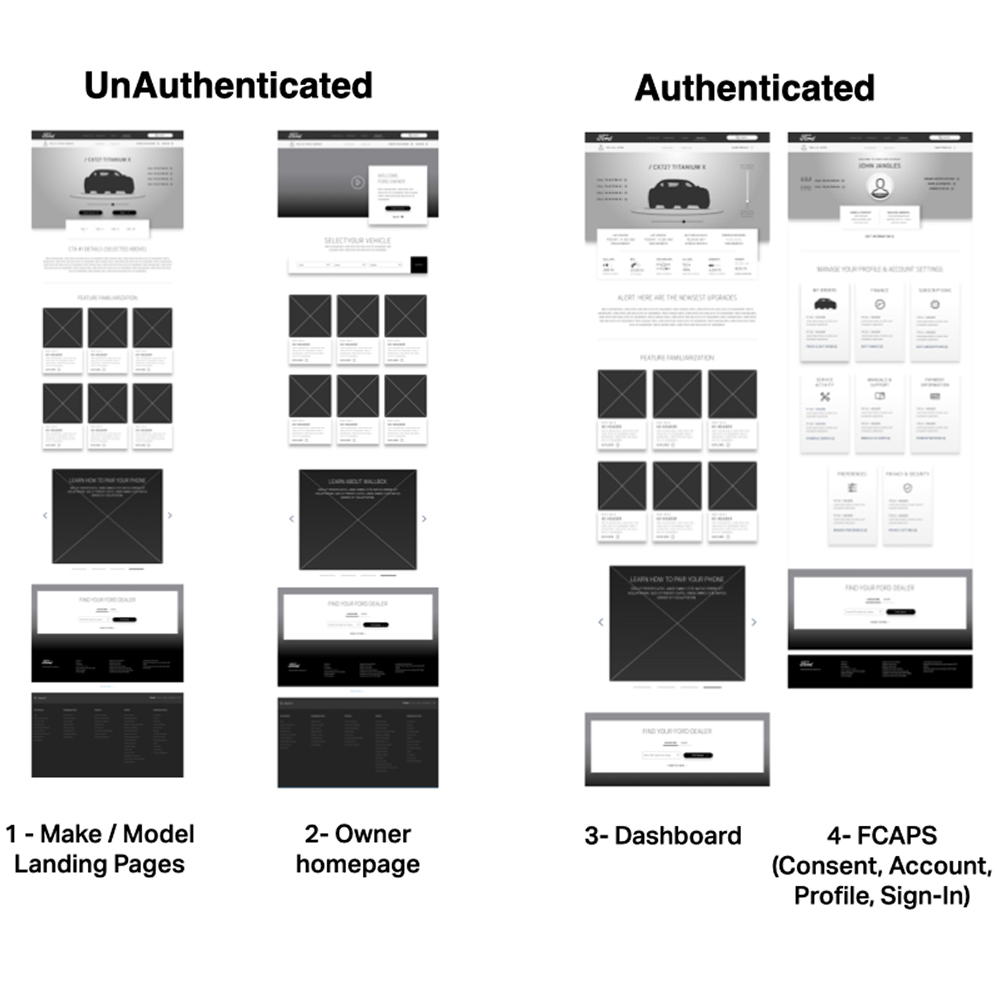
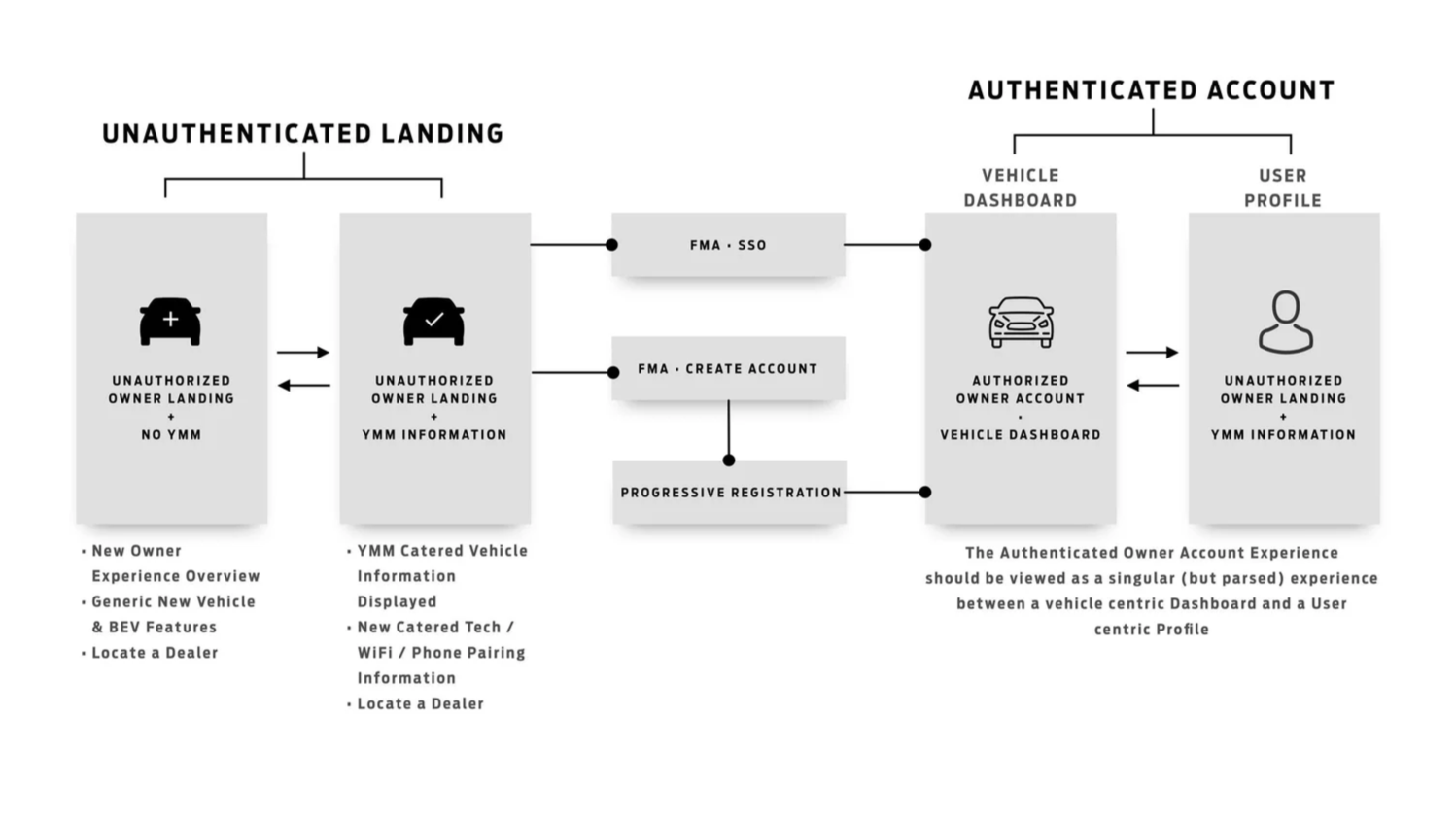
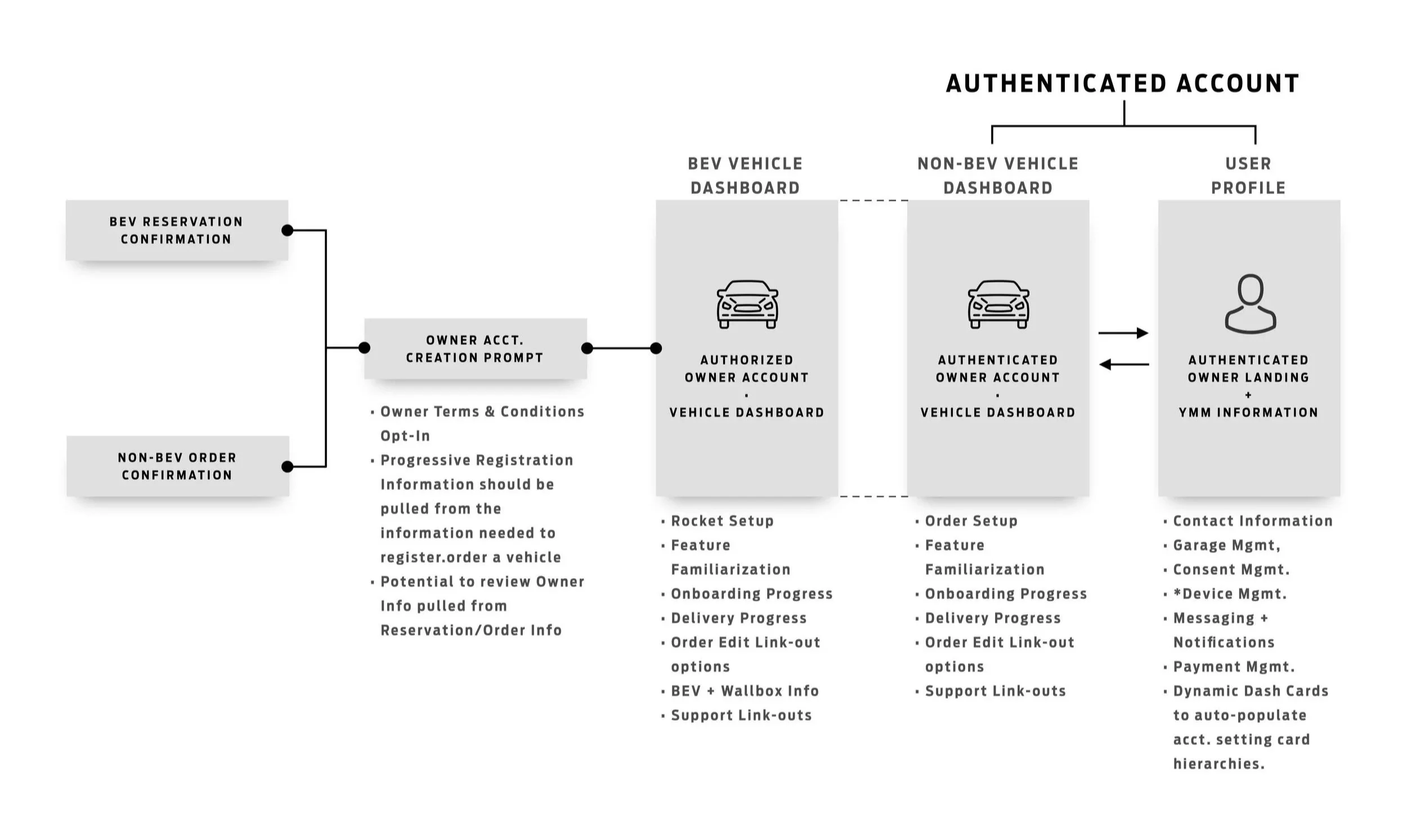
Four Owners, One Platform The most important structural decision I made on this project. Four distinct Owner states โ€” each with its own routing logic, content strategy, and auth behavior. Every feature built after this was designed against it.
Owner 01 Unauthenticated
No account, no vehicle. Entry via marketing, SEO, direct navigation. Get them in without friction.
Owner 02 Reserved / Ordered
Account exists. Vehicle in transit. Manage the wait, surface Rocket Setup, start pre-delivery education.
Owner 03 New Owner
Vehicle delivered. Onboarding to complete, EV education to surface, trust to build. Where Ford Owner earns repeat visits or loses them.
Owner 04 Existing Owner
Fully onboarded. Coming back for service, features, and answers. The platform has to earn this return every time.
View Owner States โž
Key Features SSO was the first feature through the migration โ€” the foundational auth layer that every other feature depends on. From there, the Pre-Delivery Owner state became the highest-leverage window in the entire ownership lifecycle: the stretch between purchase and first drive, when an Owner is motivated, curious, and forming their long-term relationship with the vehicle. Every feature below routes back to a single account model, so the work an Owner does before delivery carries straight through to the day they take the keys.
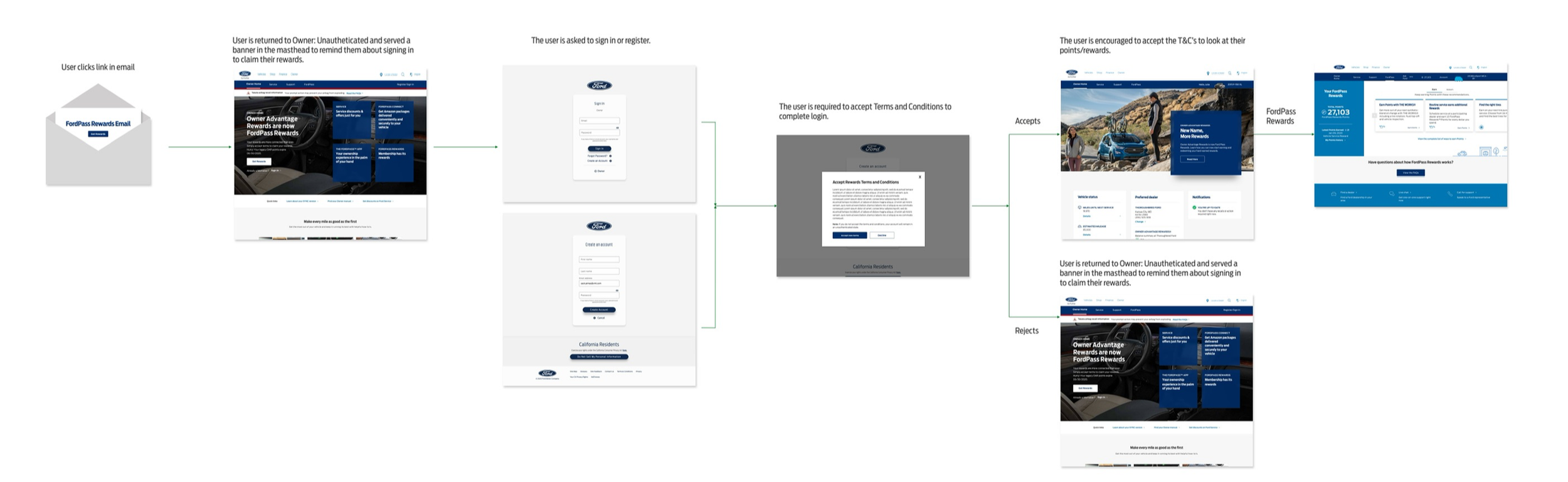
Single Sign-On (SSO) Redesign SSO was the first feature through the AEM migration and the proof-of-concept for the entire platform. Owners were managing separate logins across Owner Web, FordPass, and dealer services โ€” friction that compounded at every touchpoint. I redesigned the SSO flow to unify authentication across surfaces, consolidating identity into one account that follows the Owner from web to app to vehicle. Support contacts dropped across NA and European markets after launch โ€” first real signal the new patterns were working. SSO โž
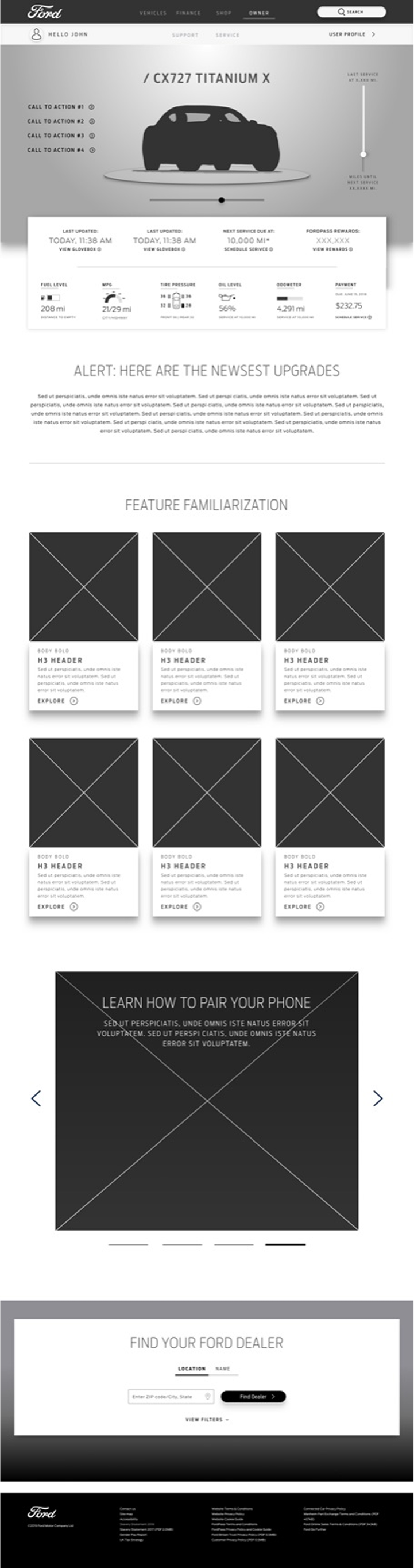
Pre-Delivery Personalization Triggered by the shipment email. Owners would start it, step away, and lose track. I built re-entry directly into the dashboard โ€” prominent callout, picks up where they stopped. No hunting required. Pre-Delivery Setup โž
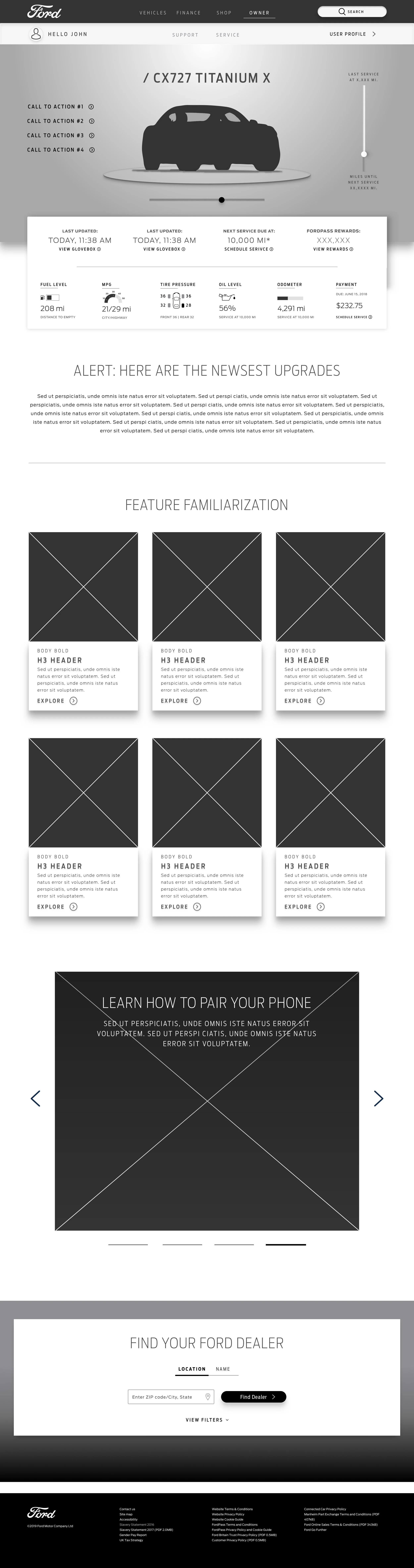
BEV Feature Familiarization Post-purchase email drops a link to feature familiarization for the Owner's specific vehicle. Authenticated access to an overview of everything included in their CX727 โ€” surfaces what's relevant to them, not a generic feature dump. EV Onboarding โž
Wall Charging + Charging Education Owners were Googling charging info โ€” finding Ford content through search, not through the platform. I built the charging education pages to work unauthenticated so they capture that entry point. Covered Charging Status, Charge Times, Charge Level Notification, and Wall Charging โ€” quick digestible overviews with deep-dive paths for each topic. Charging: 101 โž
Wall-Box Onboarding โ€” Home Charging Setup Home wall-box installation is one of the highest-friction moments in the BEV ownership journey โ€” electrician handoff, permits, amperage, charge station pairing. I built a dedicated flow that connects the Owner's vehicle spec to a clear installation path, surfacing the right guidance at the right step without burying it behind generic EV content. Wall-Box Onboarding โž
New Feature Launch with Authenticated Save Feature launches without a hook lose people. I designed the unauth overview as the entry point โ€” show the value first, then ask for sign-in to save the trip. Feature interest โ†’ account engagement. Trip Planner โž
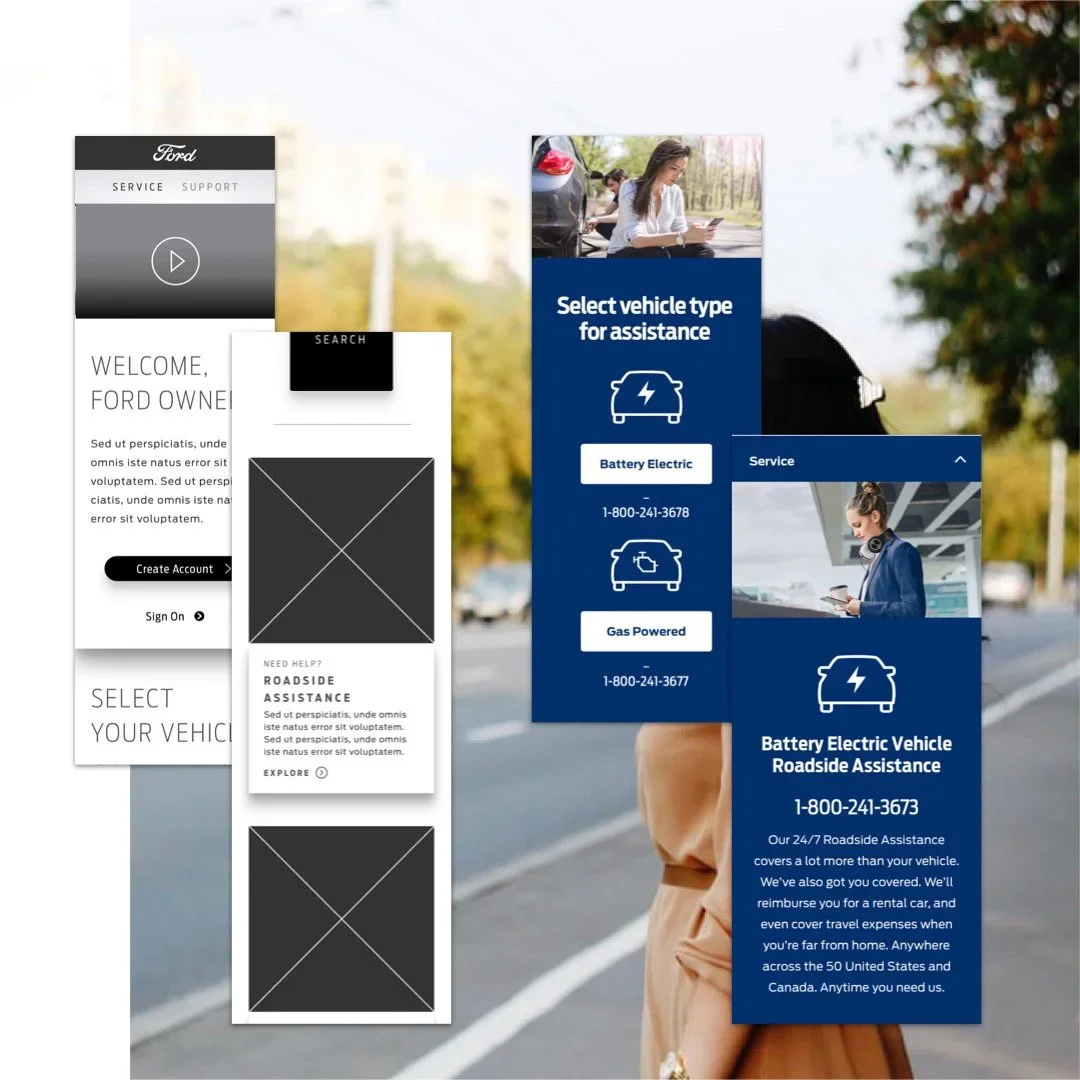
Roadside Assistance โ€” Mobile, High-Stress Owner on the side of the road, pulling up Ford Owner on their phone. That's the moment. I surfaced Roadside Assistance as a callout right at authentication โ€” visible before they even get into their account. High-stress moment turned into a confidence signal. Maintenance + Repair โž
What Shipped + What It Moved
Support Ticket Reduction โ€” Western Markets SSO was the first feature through the migration. Support contacts dropped across NA and European markets combined. First real proof the new patterns were working.
Components Fed Ford's Global Design System I was rolling components out on a production schedule and recognized an opportunity to integrate emerging design system standards directly into working, shippable components. My work on the Owner Web migration was already aligned with the direction the broader FDS team was heading, and those components became part of the foundation when the formal Design System was established.
Working alongside the Mach-E HMI team โ€” not in a Web silo โ€” meant those components were stress-tested against vehicle contexts from the start.
Western Market Unification โ€” Ford + Lincoln One component set, adopted as the authoring standard across NA and Europe. Ford and Lincoln share the same AEM authoring system โ€” so the work applied to both. Teams shipping without a dedicated designer on every workstream. That's the point.
Accessibility Built In, Not Bolted On WCAG checks ran during the audit โ€” not added later. Every button, dropdown, input, and card shipped clean. No catch-up work for the DS team.
Two Years. Shipped. Audit, research synthesis, state model, SSO redesign, component rationalization, WCAG validation, icon library, and five feature workstreams. NA design lead, western market reach, cross-functional team. Done.
Owner Web was the proof of concept. Ford DS was the prevention. Patterns drift without governance. The migration proved consolidation works โ€” but it also showed the risk: once the project ends, teams diverge again without a system to hold the line. Ford DS was the answer. Foundations, tokens, componentized patterns, behavior specs. Teams ship without reinventing. No dedicated designer required on every workstream. Ford Design System Case Study โž
"I came in as the NA Design Lead on a broken, fragmented platform โ€” four markets doing their own thing. I left it with a state model, a clean component library that fed a global design system, and a measurable drop in support load across western markets."

FORD MEMBER ACCESS (FMA)
(AKA) SINGLE SIGN-ON


CREATE ACCOUNT

SINGLE SIGN-ON
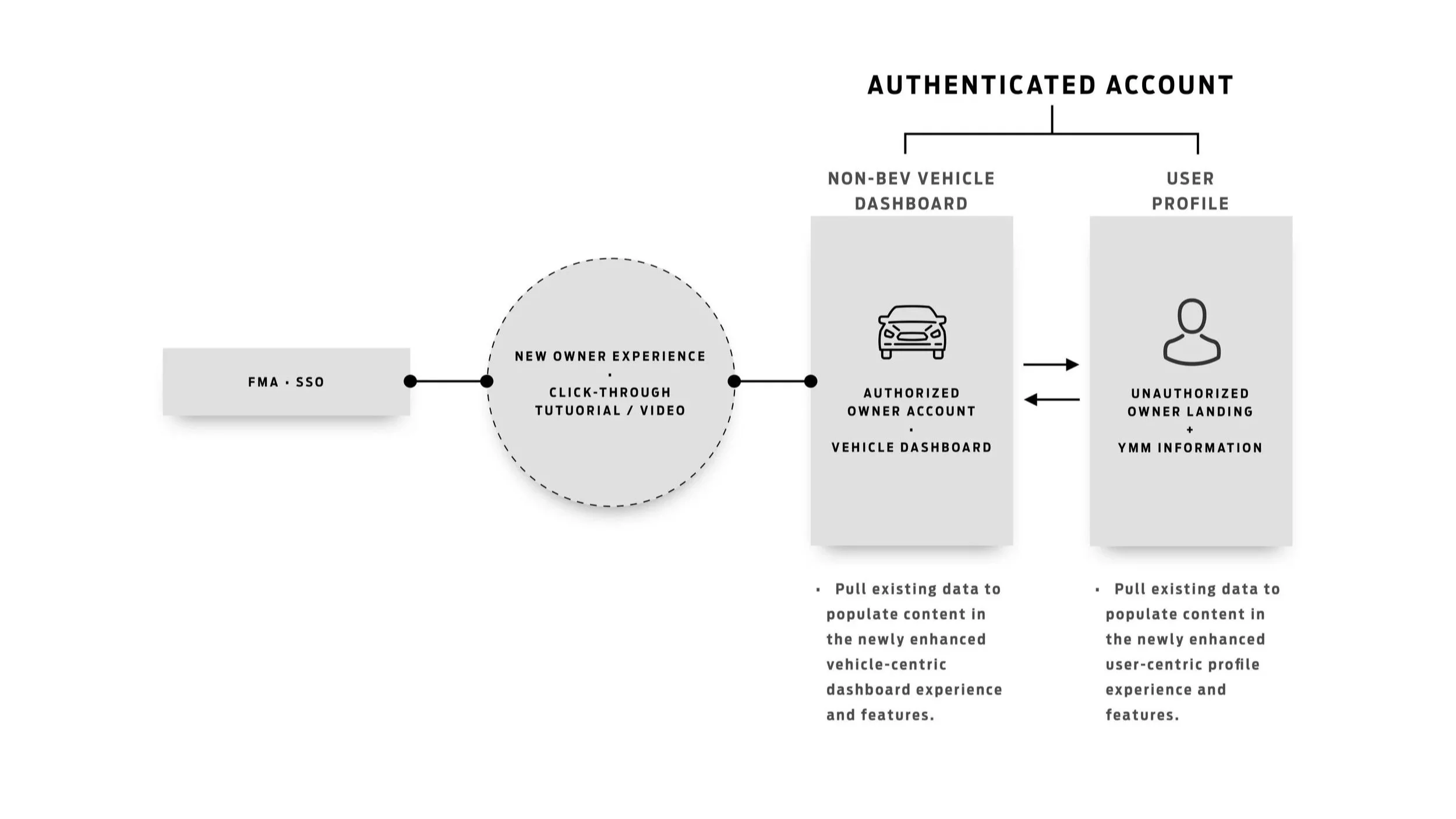
GLOBAL OWNER STATES

OWNER ACCOUNT ALIGNMENT FROM REGIONAL DIFFERENCES TO A GLOBAL CONVERGENCE

Globally, Owner sits on separate stacks, is powered by different AEM component frameworks, and is presented through different UX, style guides, and strategies. Our current situation lacks fitness across tech, CRUX, analytics, and strategy.
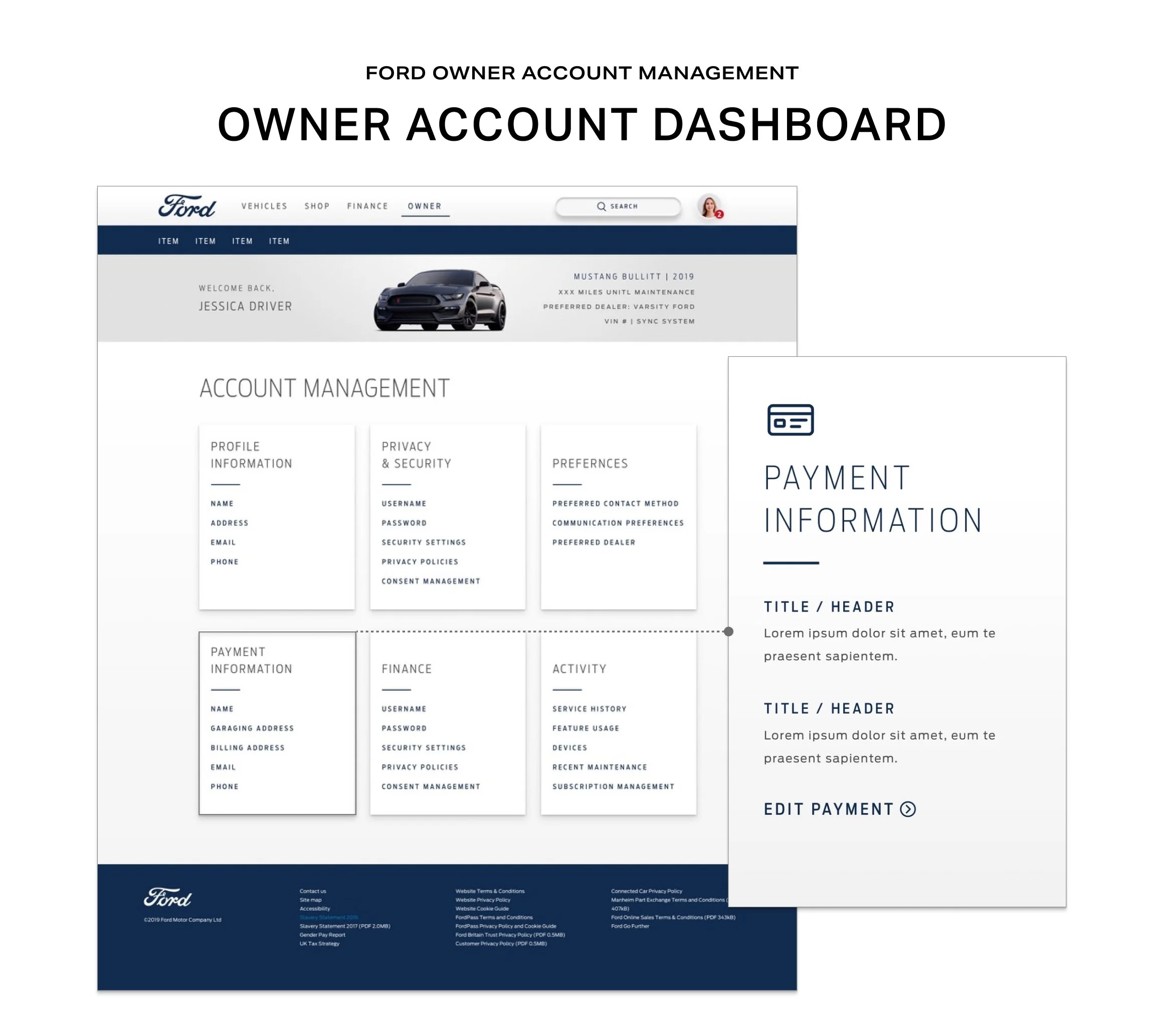
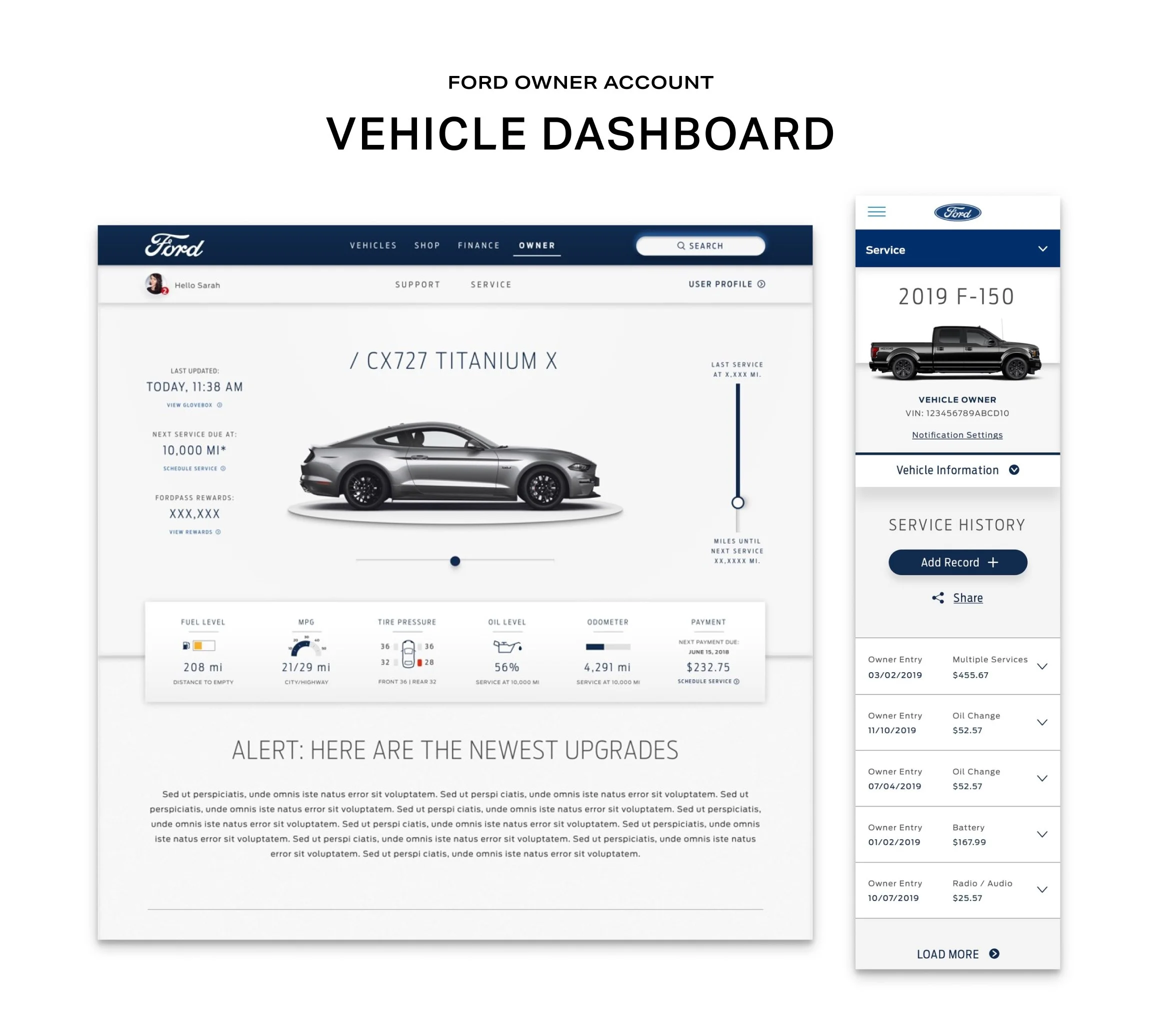
GLOBAL ACCOUNT | OWNER STATE NO.1
UNAUTHENTICATED
GLOBAL ACCOUNT OWNER STATE NO.2
RESERVED / ORDERED
GLOBAL ACCOUNT | OWNER STATE NO.3
NEW OWNER
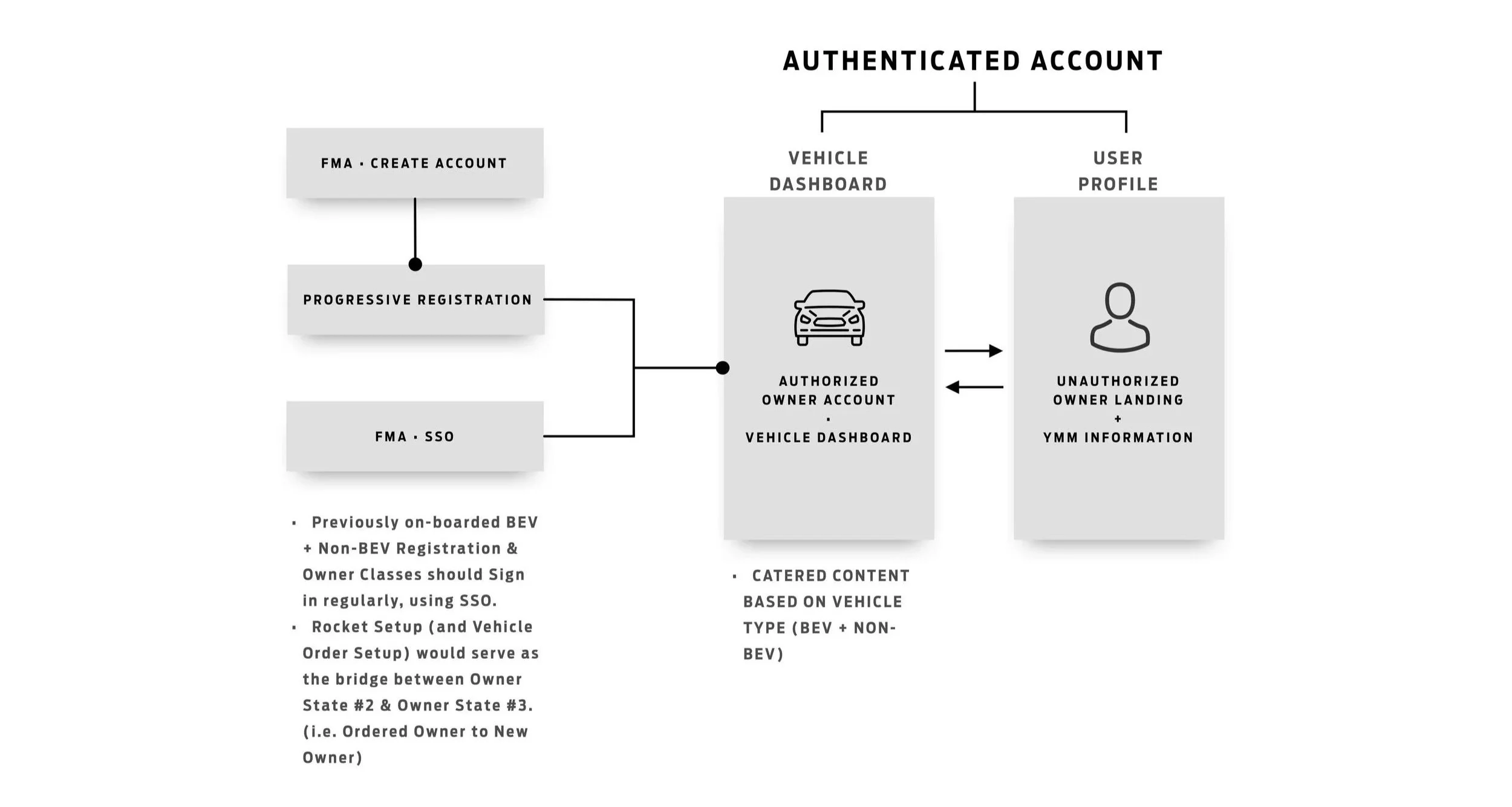
GLOBAL ACCOUNT | OWNER STATE NO.4
EXISTING OWNER

USER: SARAH

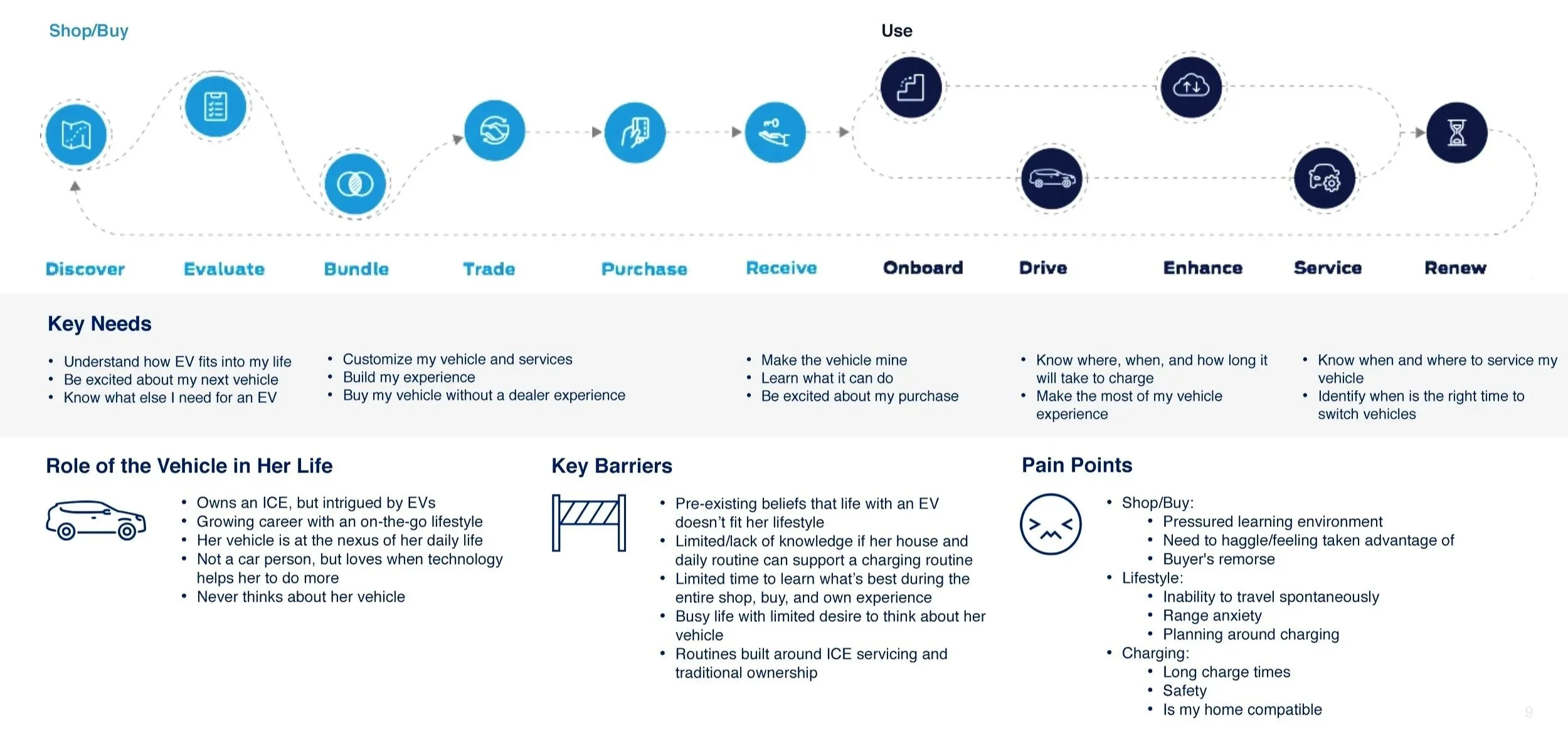
Sarah recently purchased her first BEV. She usually gets overwhelmed by car ownership, but is excited about the CX727's simplicity and future-forwardness.

SUMMARY

โœฆ Female, 37 
โœฆ Intrigued by BEVs 
โœฆ Made for a Connected Vehicle
โœฆ Growing Career & Active Lifestyle

DETAILS

โœฆ Her vehicle is at the nexus of daily life
โœฆ Not a car person, but loves technology
โœฆ Never thinks about her vehicle
โœฆ She is a social butterfly

MOTIVATIONS

โœฆ Experience a life uninterrupted
โœฆ Feels her vehicle โ€˜just gets me.'
โœฆ Makes a difference
โœฆ Feels sheโ€™s moving into the future
  • "I just want to know my car is on its way."

    "I'll come back to this later โ€” I don't have time right now."

    • Verbally expresses excitement about the vehicle at purchase

    • Asks dealership staff about connectivity and app features

    • Mentions she "Googled it" when looking for charging info

  • "Why is this taking so long at the dealership?"

    "How do I even charge this thing at home?"

    • Wonders if she set everything up correctly after leaving mid-flow

    • Unsure whether Ford Owner is the official or best source for answers

    • Quietly anxious about the EV learning curve she didn't anticipate

    • Hopes the app and website will "just sync" without extra effort

  • "Searches Google before going to Ford Owner directly."

    • Clicks email CTA link to start Rocket Setup, then abandons mid-flow

    • Returns via vehicle dashboard callout โ€” not direct URL recall

    • Uses Ford Owner on mobile during a roadside stress situation

    • Searches charging topics by specific feature: status, timing, notifications

    • Authenticates to save Trip Planner content โ€” unprompted, task-driven

    • Revisits Ford Owner repeatedly once it proves useful

  • "Relieved when she finds the right answer fast."

    • Restless and fatigued after a long dealership experience

    • Excited but quietly overwhelmed by the EV features ahead

    • Reassured when Ford Owner reflects her setup data correctly

    • Vulnerable and stressed during the pothole / roadside incident

    • Grows confident in Ford Owner as a resource over time

    • Surprised (positively) when the platform anticipates her needs

    • No clear re-entry point when she abandons Rocket Setup mid-flow

    • EV charging education isn't proactively surfaced โ€” she has to find it via Google

    • Dealership process leaves her drained before digital onboarding even begins

    • Unclear whether account data will carry across web, app, and in-vehicle

    • Roadside stress amplifies any friction in mobile experience

    • Prominent dashboard callout rescues her abandoned Rocket Setup โ€” zero re-work

    • Seeing her profile auto-populate from setup builds immediate trust in the platform

    • Vehicle-specific charging content reduces EV anxiety to manageable curiosity

    • Roadside Assistance callout on mobile converts a stressful moment into a confidence signal

    • Ford Owner becomes her default resource โ€” earned, not assumed


ROCKET SETUP

OWNER JOURNEY | PRE - DELIVERY

JOURNEY ROCKET SETUP 1/2
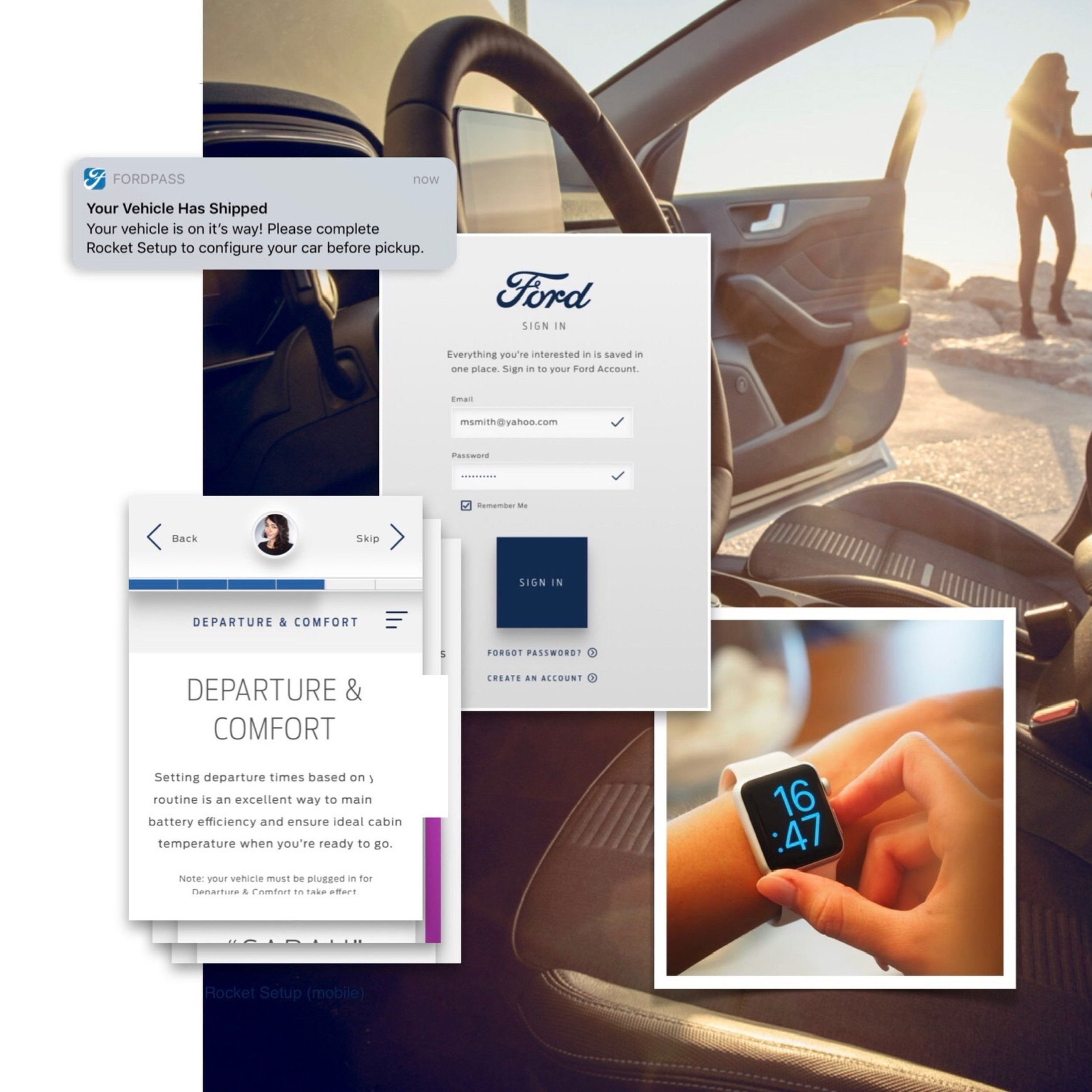
VEHICLE HAS SHIPPED
Sarah receives a communication informing her that her vehicle has shipped. Within that communication, there is a brief explanation and a link to Rocket Setup.

BEGINNING ROCKET SETUP
She clicks on the link, authenticates, and begins the process, but partway through, she needs to step away.

JOURNEY ROCKET SETUP 2/2
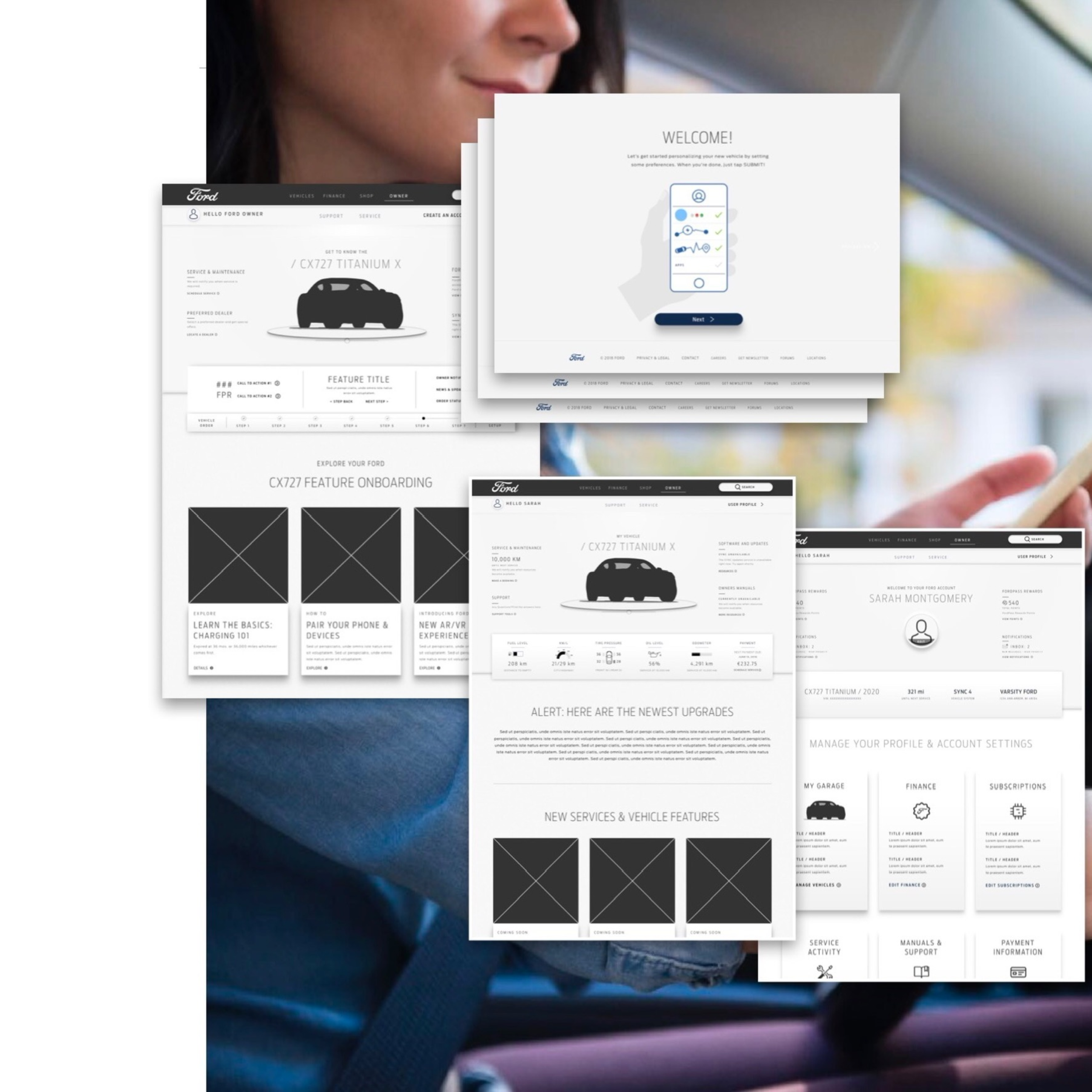
RETURNING TO ROCKET SETUP
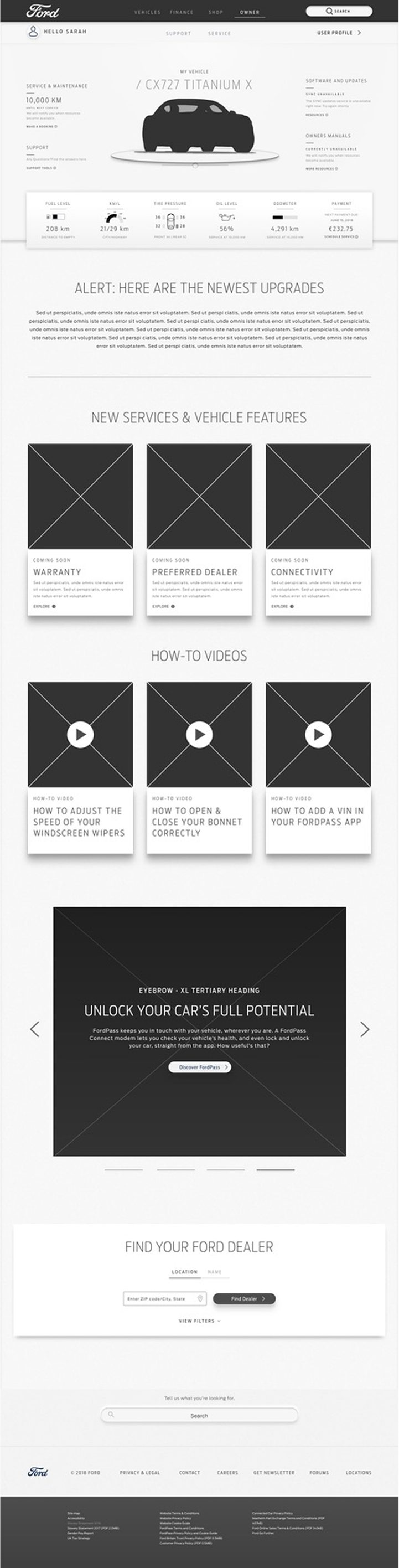
Later, Sarah comes to the Ford Owner site and is easily able to hop back into Rocket Setup via a prominent callout on her CX727 vehicle page.


VEHICLE AND PROFILE ALIGNMENT
As she completes Rocket Setup, Sarah goes back to her Ford Owner vehicle page, which now reflects the information she just entered. Some info has even populated her user profile.

A TRUSTED RESOURCE
With all the great content available to learn about her new vehicle, Sarah decides to return to Ford Owner each time she wants to learn more about her CX727

OWNER ONBOARDING

OWNER JOURNEY | PRE - DELIVERY

JOURNEY EV-OWNER ONBOARDING
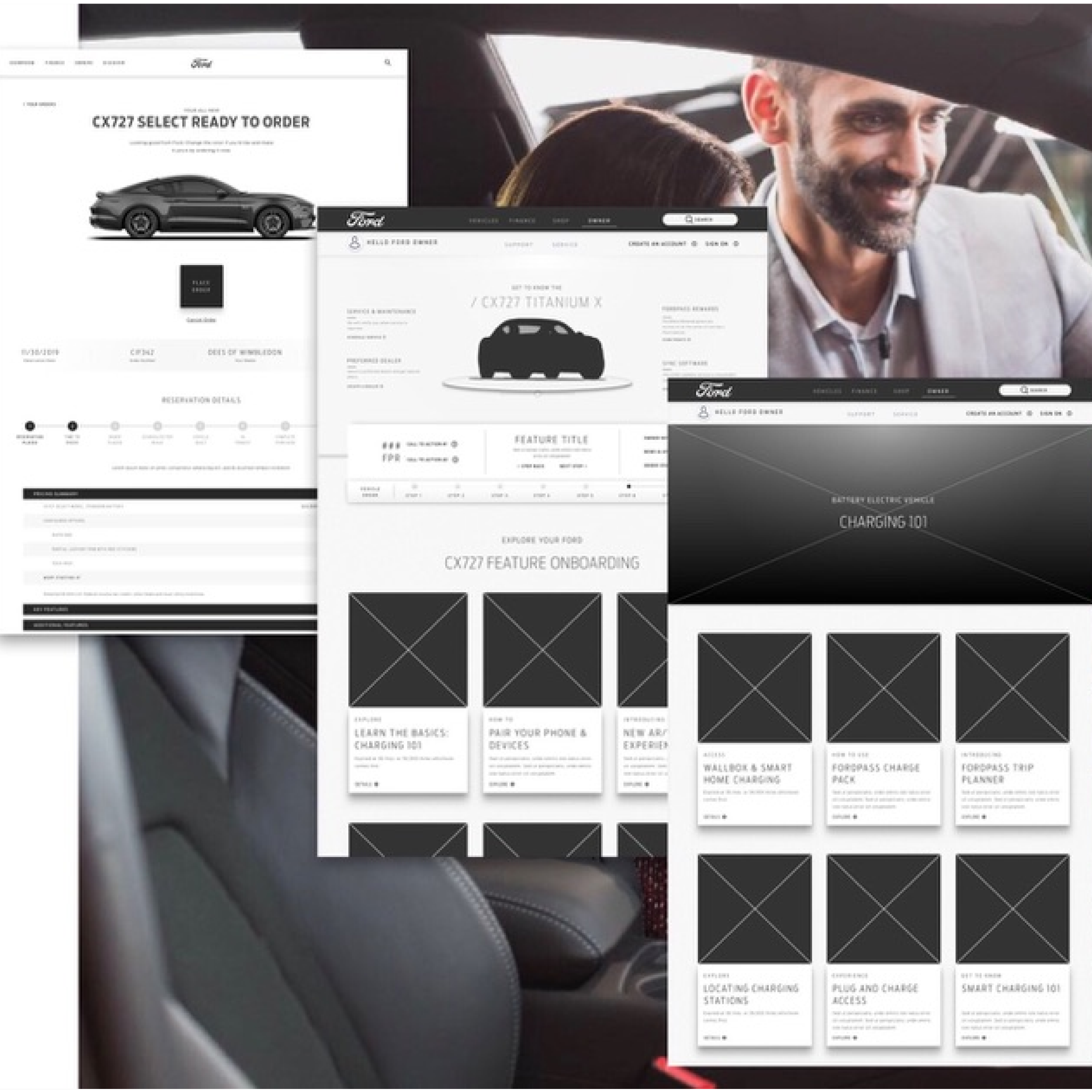
ECOMMERCE PURCHASE COMPLETED
Sarah receives a post-purchase communication with an overview of her purchase. It includes a link to Feature Familiarization for her specific vehicle. Sarah clicks on the link and authenticates to access her CX727 owner page. The page includes access to overviews on features that are included in her vehicle.

LEARNING ABOUT CHARGING
Within that same communication, Sarah sees a link providing an overview on Charging. She clicks through to an unauthenticated page that provides a comprehensive overview of all the various Charging features that come with her CX727

JOURNEY CHARGING: 101
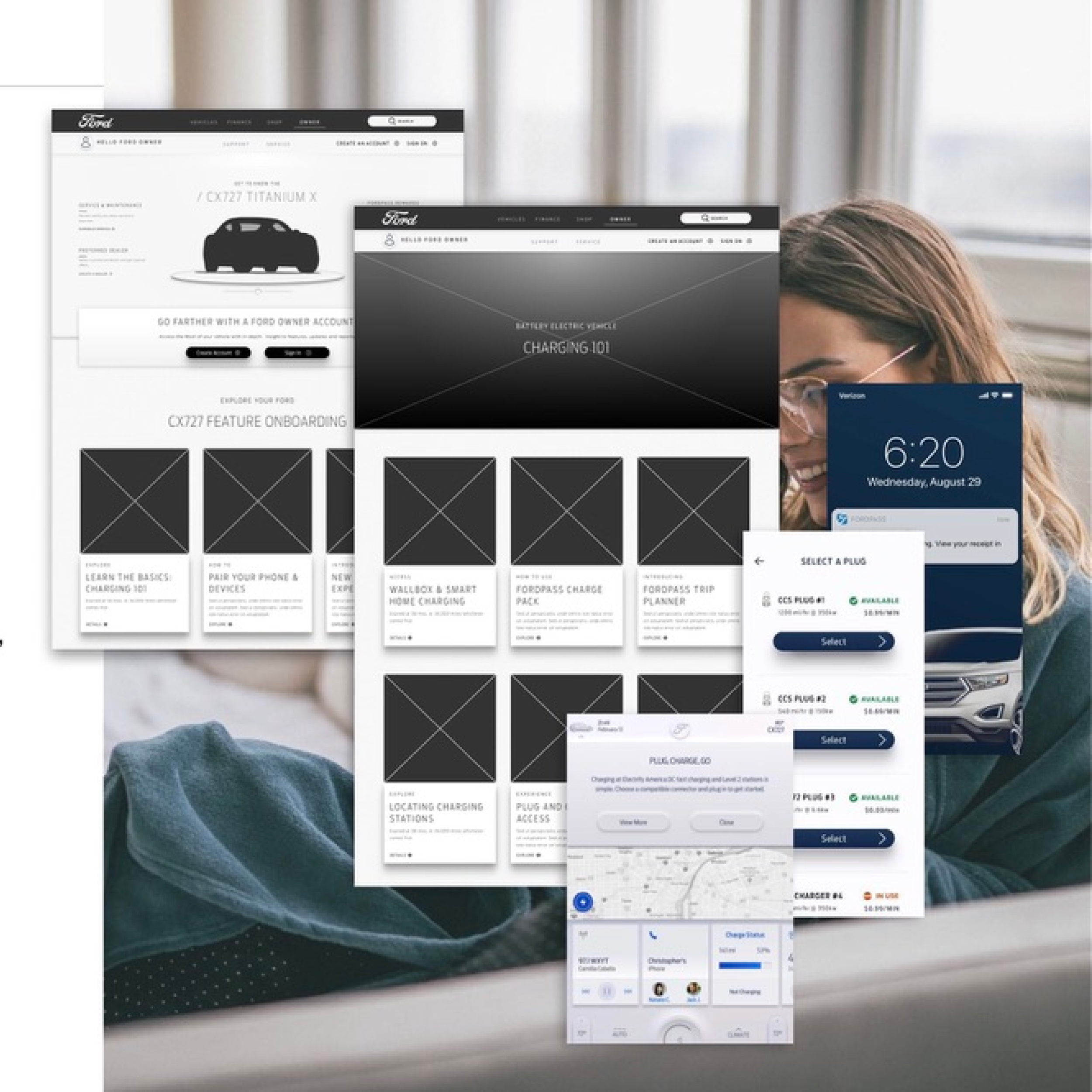
EV-Onboarding

COMMERCE PURCHASE COMPLETED
A few weeks after purchasing her vehicle, Sarah wants to search for information on Charging her CX727.

After performing a Google search, Sarah clicks on a CX727 Charging Overview. This page includes quick, digestible overviews and deep dives on all things charging.

Sarah is most interested in learning about Charging Status, Charge Times and Charge Level Notification. She clicks through on each topic to learn more.

WALL-BOX ADOPTION

OWNER JOURNEY | PRE - DELIVERY

WALL BOX DISCOVER & EVALUATE
VISITS FORD.COM
Sarah wants to buy an EV and visits Ford.com, where she finds that she likes the CX727.

EXPLORES CHARGING SOLUTIONS
She wants to identify the best charging solution for her driving routine, which includes her daily commute and the occasional weekend road trip.

30 DAYS FROM DELIVERY
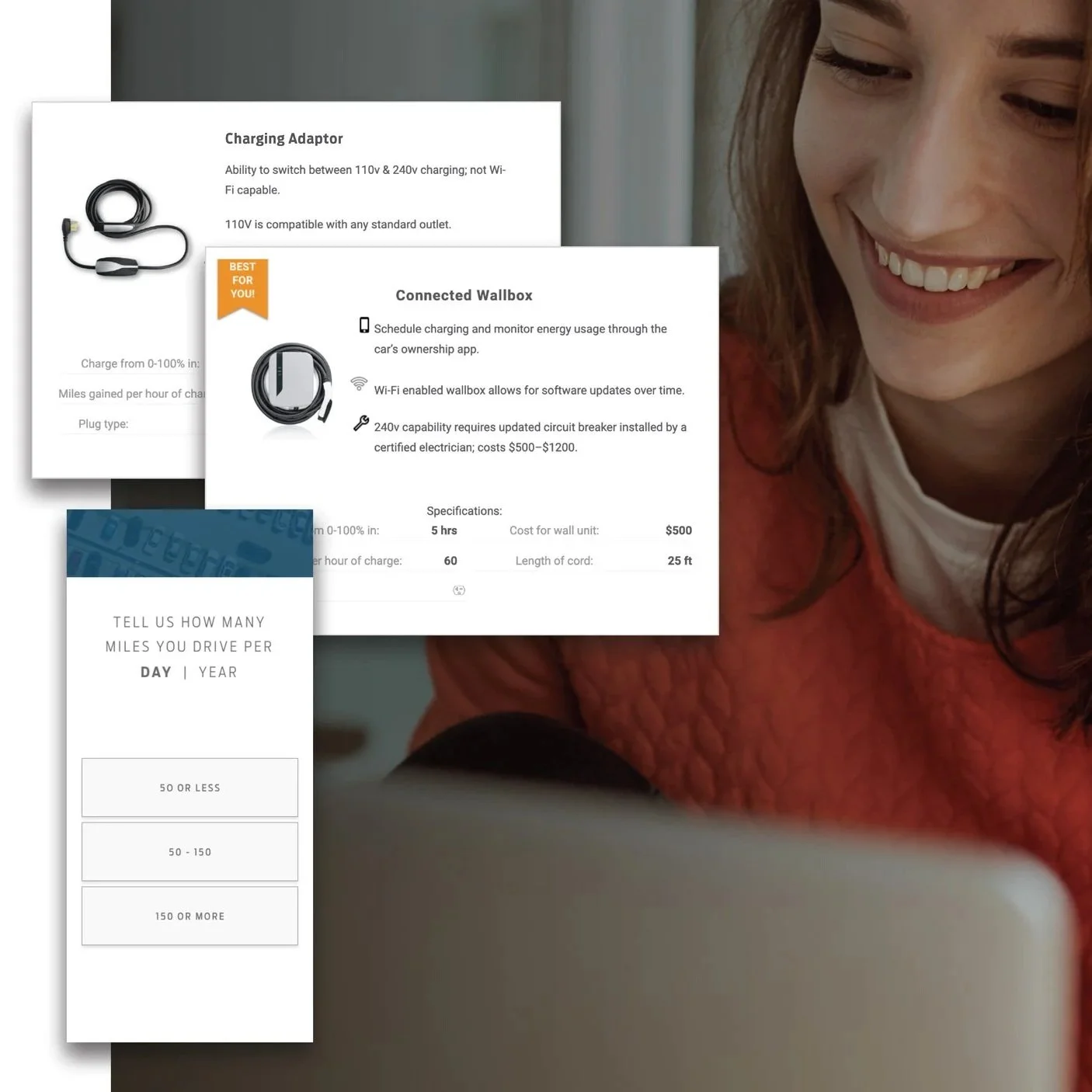
Sarah finds Try The Tech on the CX727 landing page and it helps her better understand how it stacks up against her needs.

COMPARES ADAPTOR TO WALLBOX & LEARNS ABOUT INSTALLATION
There, she learns about the differences between the charging adaptor and Wallbox. She learns that Ford has identified certified electricians to help her achieve an effortless Wallbox installation.

ADDS WALLBOX TO HER CX727 BUILD
Sarah answers a few quick questions about her daily driving habits and receives an EV recommendation summary. She then adds the Wallbox to her CX727 build.

WALL BOX BUNDLE & PURCHASE
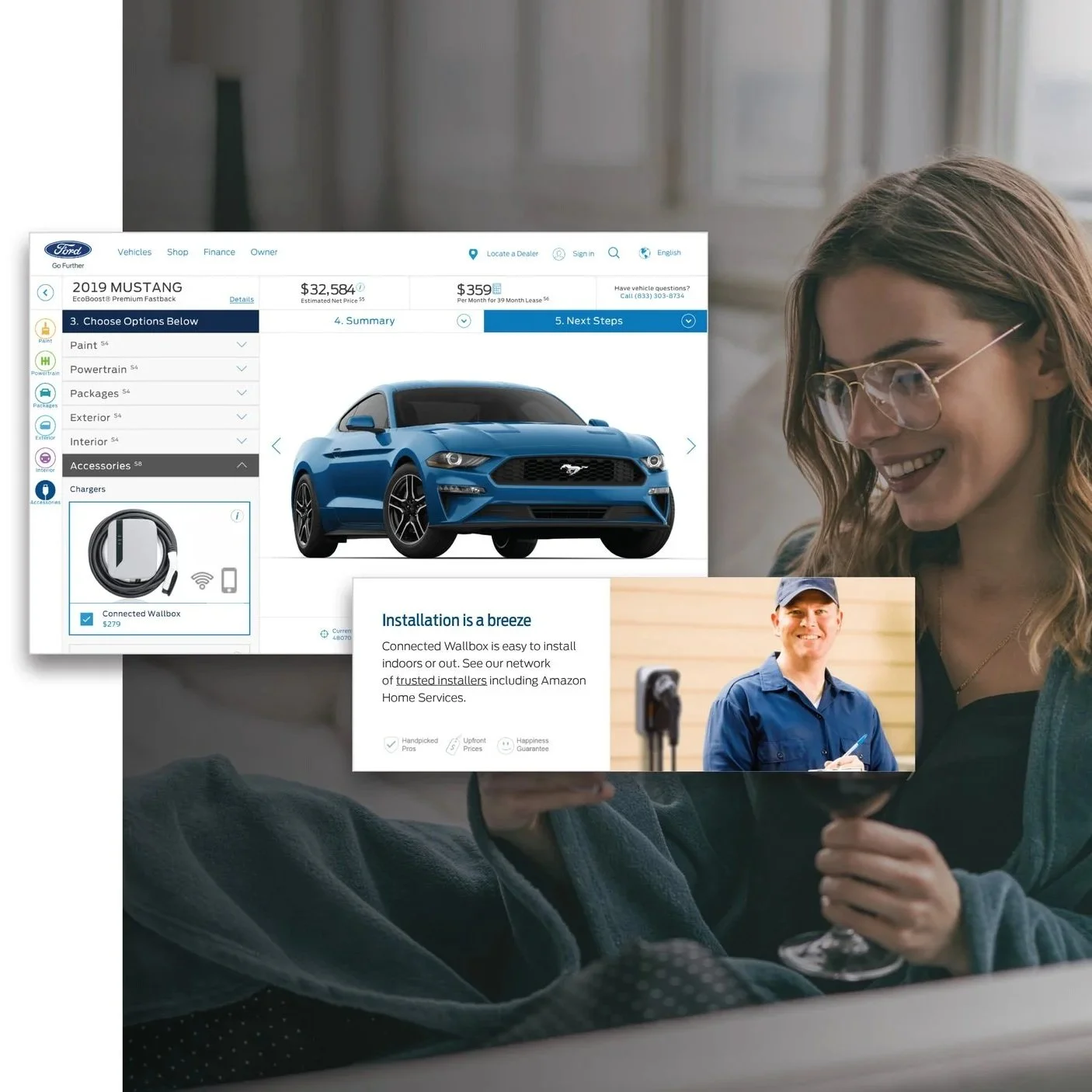
INCLUDE WALLBOX IN BUILD & PRICE
Sarah continues her CX727 build and notices that the Wallbox and its cost are already factored into to her โ€œBuild and Priceโ€.

FORD RECOMMENDS PRO INSTALLATION
She decides to reserve the CX727 online. Since she has the Wallbox included, Ford recommends that she go ahead and plan a professional installation.

LINK TO AMAZON FOR INSTALLATION APPOINTMENT
On the purchase confirmation page, Sarah clicks on a link to Amazon where she can easily schedule her Wallbox installation with a certified electrician.

WALL BOX RECIEVED
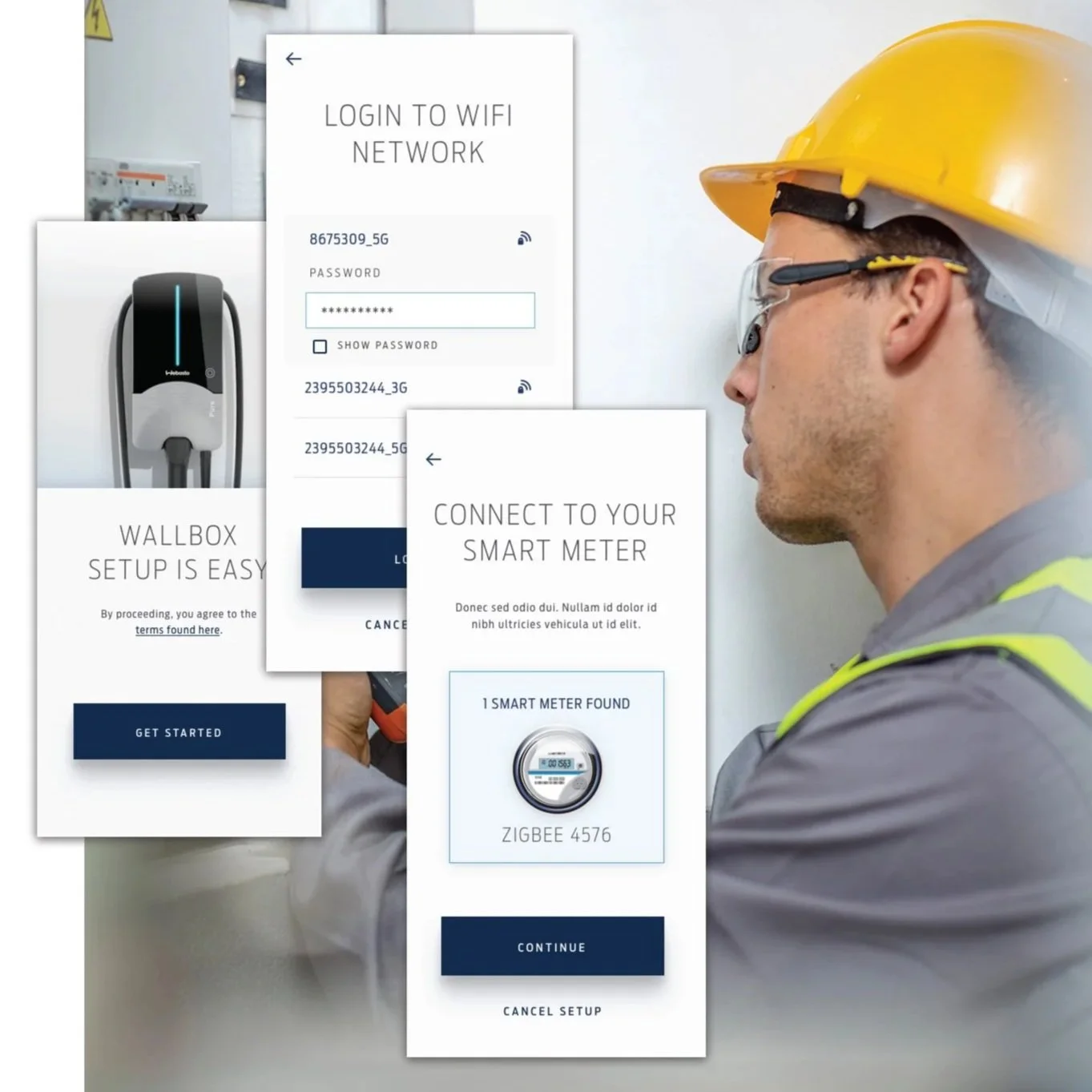
WALLBOX SHIPMENT CONFIRMATION
Sarah receives an email confirmation that her Wallbox has shipped* and hopes the setup process will be quick and easy.

INSTALLER ARRIVES PROMPTLY FOR INSTALL
The installer is notified when the shipment is delivered to Sarah. A few days later, he arrives as scheduled at Sarah's home and starts the Wallbox install.

PAIRS WALLBOX WITH APP
The installer helps Sarahโ€™s to pair the Wallbox via the Wallbox Setup App and a bluetooth connection.

CONNECTING WALLBOX AND SMART METER
Sarah connects the Wallbox to her Wi-Fi by providing her Wi-Fi network login info and then connects the Wallbox to her Current Sensor.

WALL BOX ONBOARD
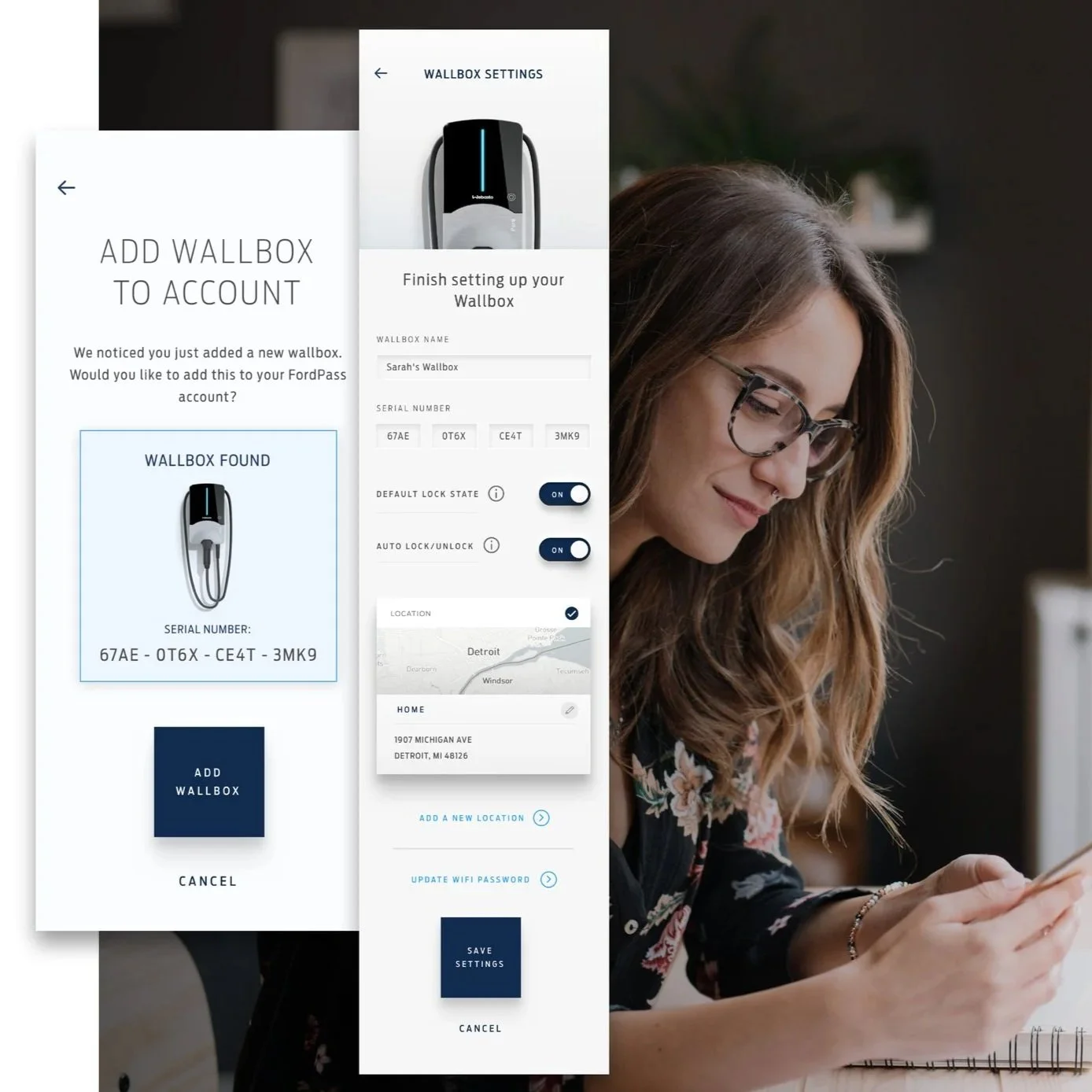
CONNECTING WALLBOX TO FORDPASS
Sarah logs into the FordPass app to connect her Wallbox to her FordPass account.

WALLBOX IS LISTED ON HER NETWORK
Sarah easily adds her Wallbox to her FordPass account.

TURNING ON ACCESS CONTROL
The installer walks Sarah through setting up her Wallbox preferences in FordPass and she opts to lock her Wallbox so only she can use it to charge.

FINISHES CONFIGURING WALLBOX
Sarahโ€™s configures the max charging rate based on her electrical box capabilities.

WALL BOX DRIVE & USE 1/2
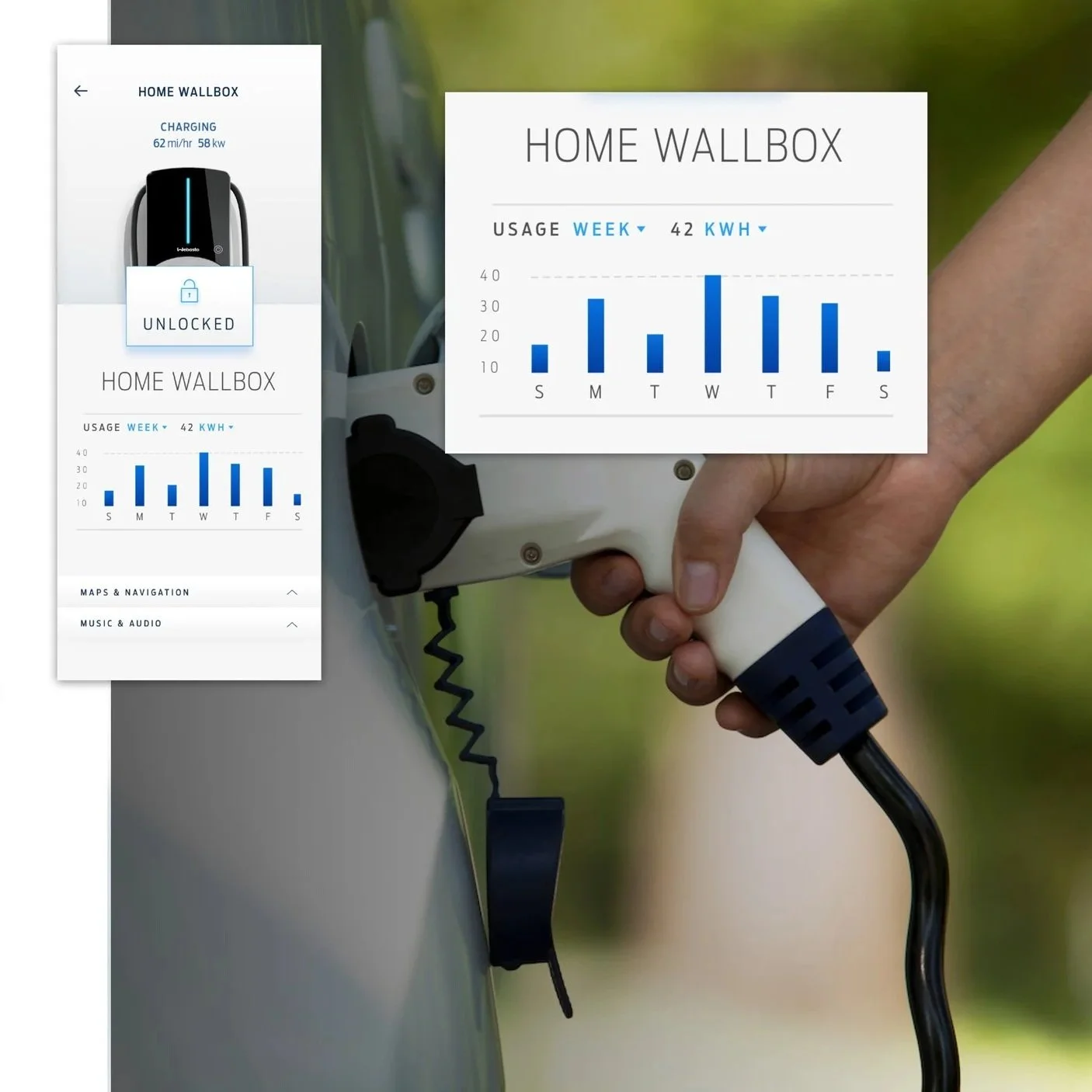
OVERRIDING SCHEDULE WITH โ€˜CHARGE NOWโ€™
Sarah tries out her new Wallbox to see how it works. She selects โ€œOnโ€ in FordPass to override her current charging schedule and charge immediately.

CHARGING CONFIRMATION AND ALEXA UPDATES
She sees visual confirmation in the FordPass that her CX727 is currently charging. She also uses her Amazon Alexa to receive charging updates.

CHECKING HISTORICAL CHARGING DETAILS
While waiting on her morning coffee, Sarah checks to make sure that her vehicle is ready to go and fully charged. She has a few extra moments to spare and curiously checks how much energy her Wallbox has provided.

REVIEWING HER CX727 ENERGY USAGE
Sarah learns how much energy her new CX727 is using at home per month.

WALL BOX DRIVE & USE 2/2
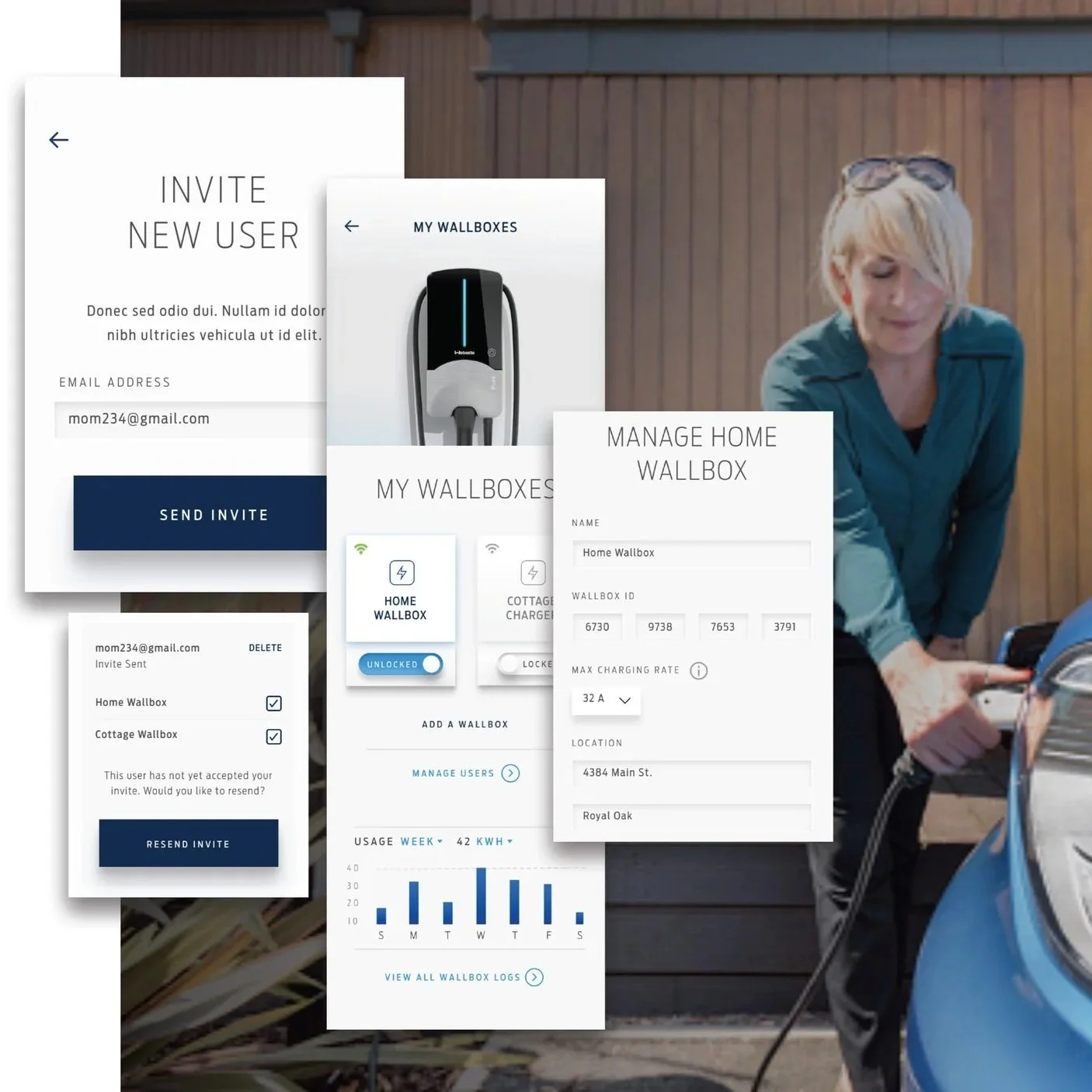
ALLOWING OTHERS TO CHARGE WITH HER WALLBOX
Sarah would like to allow her mom to charge her PHEV at her house. She invites her mother by adding her motherโ€™s email address, and her mother simply confirms through a quick email and FordPass registration process.

CHANGING HER WALLBOX NAME
With the addition of a second Wallbox, Sarah decides she would like to change the names to make them easier to identify. In FordPass, Sarah opens the settings and finds she can easily update the name of her Wallbox to something more personal.

ADDING A SECOND WALLBOX
Sarah enjoys the benefits of the Wallbox over the next few months of use. At that point, she decides to purchase another Wallbox for her vacation home.

OWNER FEATURES

OWNER JOURNEY | PRE - DELIVERY

FEATURE TRIP PLANNER
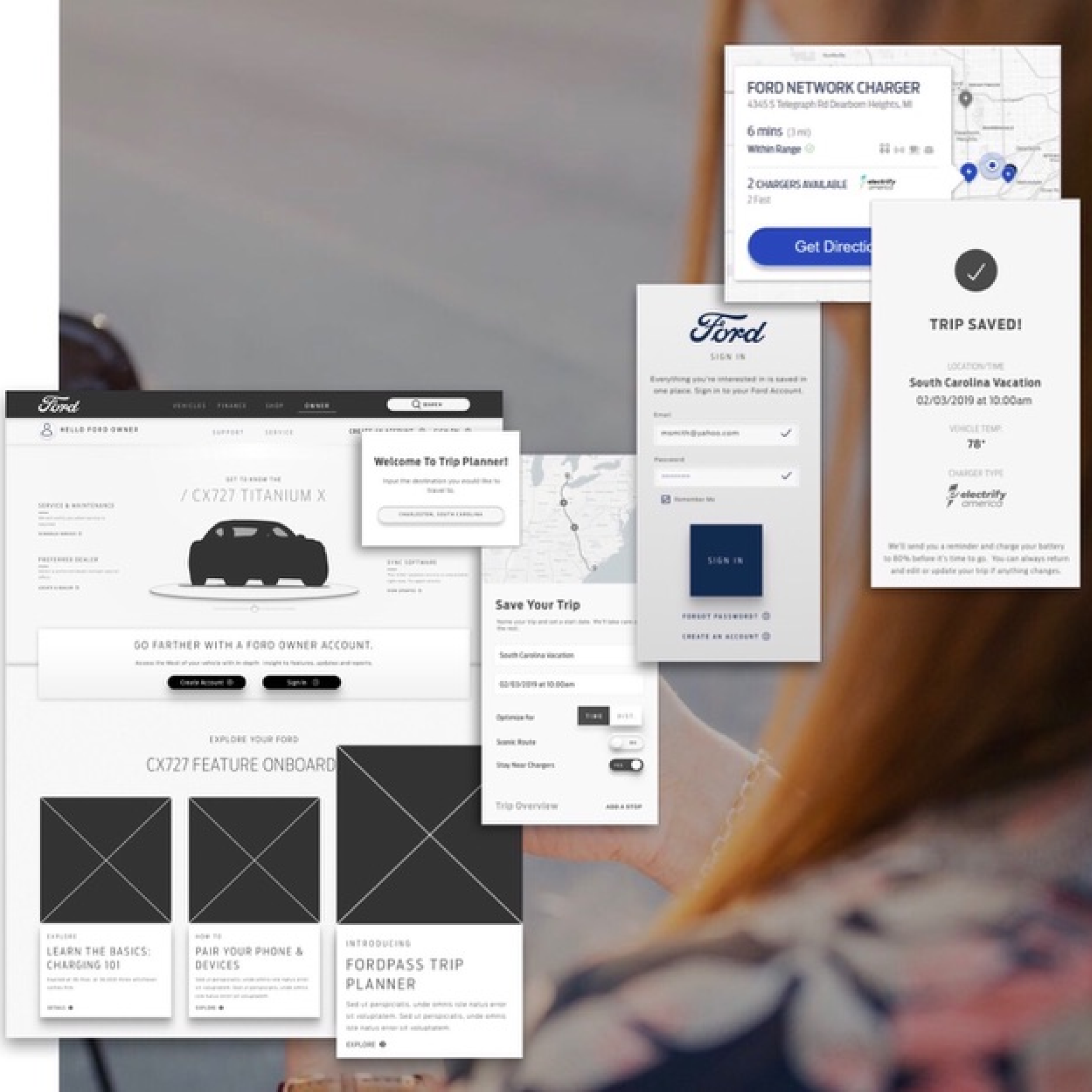
TRIP PLANNER LAUNCH
Later, Sarah receives an email that a new feature, Trip-Planner, has recently launched in Ford Owner.

Later that day, she searches for "Ford Trip Planner" and lands on an overview page for the new feature. She authenticates with her Ford Owner account to save the trip she's planned.

FEATURE MAINTENANCE โœ• REPAIR

VEHICLE HAS AN ISSUE
During her usual commute, Sarah has a bad incident with a pothole. Concerned about an odd sound, she decides to stop.

FINDING ANSWERS
Sarah is accustomed to going to Ford Owner for answers to her vehicle questions, so she pulls up Ford Owner on her mobile device. As she begins to log in to Ford Owner, Sarah notices a Roadside Assistance callout.

BUILDING CONFIDENCE
Tapping on the callout, Sarah pulls up Roadside Assistance information and sees there is content relevant to her CX727. Reassured that the team dispatched to help will know what to do with her CX727, Sarah reaches out to Roadside Assistance

โœ•

N 42ยบ 19.886'

โšน

W 083ยบ 02.745โ€™

โœ•

DETRร˜IT, MI

โšน

U.S.A.

โœ• N 42ยบ 19.886' โšน W 083ยบ 02.745โ€™ โœ• DETRร˜IT, MI โšน U.S.A.